# Accessing your process flows

## Introduction

Most work with process flows starts from your [manage process flows page](#understanding-the-process-flows-page):

<figure><img src="https://2440044887-files.gitbook.io/~/files/v0/b/gitbook-x-prod.appspot.com/o/spaces%2FLYNcUBVQwSkOMG6KjZfz%2Fuploads%2FcqP4MhulsQPMZmUqcE7D%2Fprocess%20flows%20page%201.png?alt=media&#x26;token=b77a4dce-bc55-4e0d-8f62-3a8b4ef9d420" alt=""><figcaption></figcaption></figure>

Available information and options are summarised in the sections below.

## Accessing your process flow list

To access the `manage your flows` page, follow the steps below.

{% stepper %}
{% step %}
**Log in to the Patchworks**&#x20;

If you haven't done so already, log in to the [Patchworks dashboard](https://app.wearepatchworks.com/login).
{% endstep %}

{% step %}
**Access process flows**

Select `process flows` ➤ `process flows` from the left-hand navigation menu:

<div align="left"><figure><img src="https://2440044887-files.gitbook.io/~/files/v0/b/gitbook-x-prod.appspot.com/o/spaces%2FLYNcUBVQwSkOMG6KjZfz%2Fuploads%2FhsNdbcf1KwRZNqZNdBZ4%2Faccess%20process%20flows%201.png?alt=media&#x26;token=0602e66f-b031-4f8f-9c87-42f0441fce12" alt="" width="238"><figcaption></figcaption></figure></div>
{% endstep %}
{% endstepper %}

## **Understanding the process flows page**&#x20;

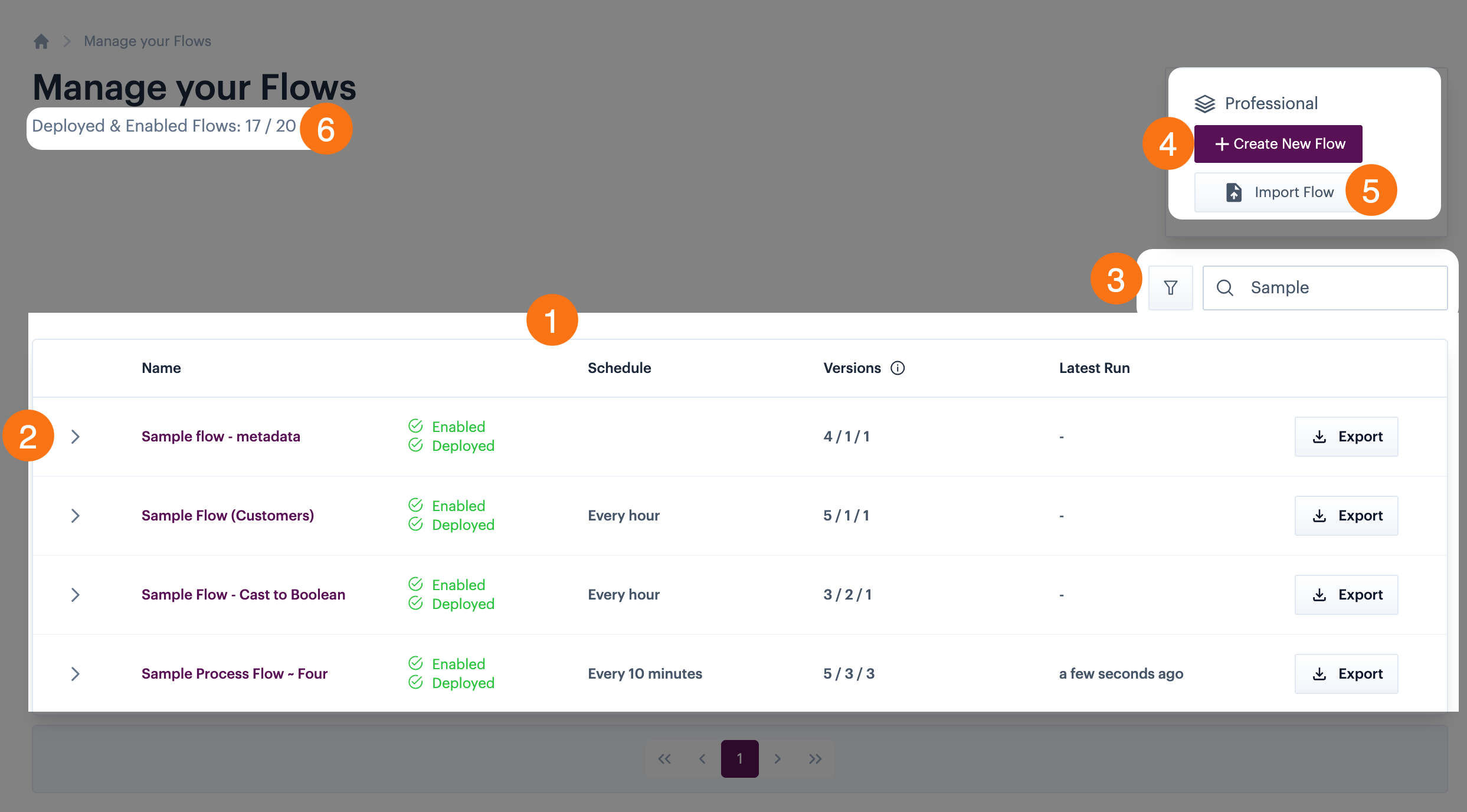
The `manage your flows` page displays all process flows created for your company profile, with associated information and options:

<figure><img src="https://2440044887-files.gitbook.io/~/files/v0/b/gitbook-x-prod.appspot.com/o/spaces%2FLYNcUBVQwSkOMG6KjZfz%2Fuploads%2FHzz5pr0R2t5WtZZqQNsd%2Fprocess%20flows%20page%20-%20annotated.png?alt=media&#x26;token=be10e432-aa7e-41f6-90bd-93025bf346e0" alt=""><figcaption></figcaption></figure>

Key details are summarised below:

1. [Process flow list](#the-process-flows-list)
2. [Version details](#process-flow-version-details)
3. [Search & filter options](#search-and-filter-options)
4. [Create new flow](https://doc.wearepatchworks.com/product-documentation/process-flows/building-process-flows/adding-a-new-process-flow)
5. [Import existing flow](https://doc.wearepatchworks.com/product-documentation/process-flows/managing-process-flows/importing-and-exporting-a-process-flow)
6. [Deployed flows count](#deployed-flows-count)

### The process flow list

The process flow list displays one entry for each process flow, with summary information shown in columns. These columns are summarised below.

{% hint style="info" %}
The information shown may vary, depending on whether the [virtual environments](https://doc.wearepatchworks.com/product-documentation/virtual-environments) feature is enabled for your company profile. Where applicable, variations are noted.
{% endhint %}

<table><thead><tr><th width="143.08203125">Column</th><th>Summary (virtual environments disabled)</th><th>Variations if virtual environments enabled</th></tr></thead><tbody><tr><td>Name</td><td>The name of the process flow is displayed as a hyperlink. Click this link to open the process flow on the <a href="building-process-flows/the-process-flow-canvas">canvas</a><br><br><img src="https://2440044887-files.gitbook.io/~/files/v0/b/gitbook-x-prod.appspot.com/o/spaces%2FLYNcUBVQwSkOMG6KjZfz%2Fuploads%2FMJIloupalnjlLxB9rNN7%2Fselect%20process%20flow.png?alt=media&#x26;token=e9e82ad0-e6b7-478c-b4ac-cc3556fb38e8" alt=""></td><td>-</td></tr><tr><td>Status</td><td>Shows the <a href="managing-process-flows/enabling-and-disabling-a-process-flow/enabling-and-disabling-a-process-flow-without-virtual-enviroments">enabled</a> and <a href="../building-process-flows/process-flow-versioning#deploying-a-draft-or-inactive-version">deployed</a> status of the process flow.</td><td>-</td></tr><tr><td>Schedule</td><td>Shows trigger shape summary information for the current <code>deployed</code> version. If no <code>deployed</code> version exists, details for the current <code>draft</code> version are shown.</td><td>Shows trigger shape summary information for the <em>latest</em> <code>deployed</code> version. If no <code>deployed</code> version exists, details for the current <code>draft</code> version are shown.</td></tr><tr><td>Versions</td><td>Shows the total number of versions for the process flow / the number of versions that are <a href="../building-process-flows/process-flow-versioning#deploying-a-draft-or-inactive-version">deployed</a>.</td><td>Shows the total number of versions for the process flow / the number of versions that are <a href="../virtual-environments/implementing-virtual-environments/deploying-a-single-process-flow-to-a-virtual-environment">deployed</a> / the number of versions that are <a href="../virtual-environments/managing-virtual-environments-versions-and-flows/managing-virtual-environment-flow-deployments/disabling-or-enabling-a-process-flow-deployment-for-a-virtual-environment">enabled</a>.</td></tr><tr><td>Latest run</td><td>The date/time that the process flow was last run (shows the time only for the current day).</td><td>-</td></tr></tbody></table>

### Search & filter options

As your list of process flows increases, it may be useful to find particular flows (or groups of flows) using filters and/or search options, at the top of the list:

<figure><img src="https://2440044887-files.gitbook.io/~/files/v0/b/gitbook-x-prod.appspot.com/o/spaces%2FLYNcUBVQwSkOMG6KjZfz%2Fuploads%2Fkxc5fSie5OV4cMbr10yx%2Fprocess%20flows%20page%20-%20search%20and%20filter.png?alt=media&#x26;token=15d00818-fabb-4c8b-997c-e466e0eff7b5" alt=""><figcaption></figcaption></figure>

#### Filtering the process flow list

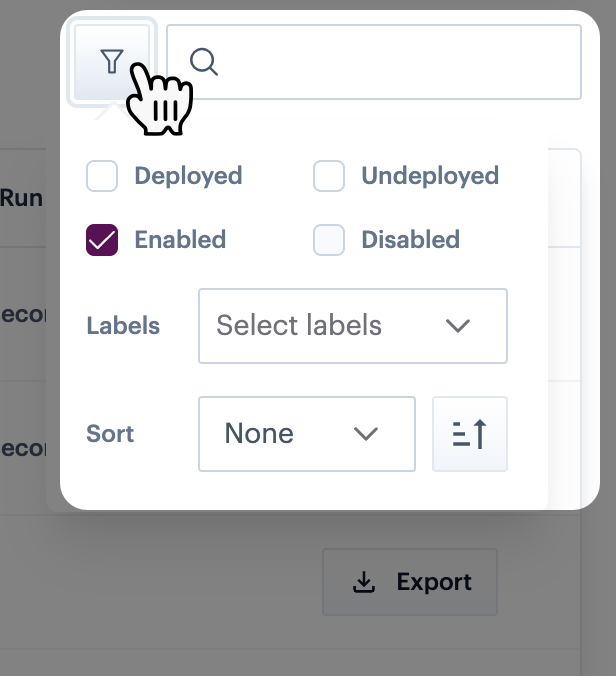
Click the `filter` icon to select filters based on flow status and/or labels:

<div align="left"><figure><img src="https://2440044887-files.gitbook.io/~/files/v0/b/gitbook-x-prod.appspot.com/o/spaces%2FLYNcUBVQwSkOMG6KjZfz%2Fuploads%2FDvU2S6wFQc5ByBF5LObN%2Fprocess%20flows%20page%20-%20filter.png?alt=media&#x26;token=969a9eeb-68b2-4ea1-8bd4-a6684963f026" alt="" width="308"><figcaption></figcaption></figure></div>

Available filters are summarised below:

{% hint style="info" %}
Status filters behave slightly differently if the [virtual environments](https://doc.wearepatchworks.com/product-documentation/virtual-environments) feature is enabled for your company profile, since a single process flow can have multiple versions with different statuses. For more information, please refer to [Understanding flow versioning for virtual environments](https://doc.wearepatchworks.com/product-documentation/virtual-environments/implementing-virtual-environments/deploying-a-single-process-flow-to-a-virtual-environment/understanding-flow-versioning-for-virtual-environments).
{% endhint %}

<table><thead><tr><th width="143.08203125">Filter</th><th>Summary (virtual environments disabled)</th><th>Variations if virtual environments enabled</th></tr></thead><tbody><tr><td>Deployed</td><td>Returns process flows that are currently <code>deployed</code>.</td><td>Returns process flows with at least one <code>deployed</code> version.</td></tr><tr><td>Undeployed</td><td>Returns process flows that are not currently <code>deployed</code>.</td><td>Returns process flows where there is no <code>deployed</code> version.</td></tr><tr><td>Enabled</td><td>Returns process flows that are currently <code>enabled</code>.</td><td>Returns process flows with at least one <code>enabled</code> version.</td></tr><tr><td>Disabled</td><td>Returns process flows that are currently <code>disabled</code>.</td><td>Returns process flows where there is no <code>enabled</code> version.</td></tr><tr><td>Labels</td><td>Returns process flows associated with the selected label(s).</td><td>-</td></tr><tr><td>Sort</td><td>Select a heading for sorting, then choose ascending/descending.</td><td>-</td></tr></tbody></table>

#### Searching the process flow list

You can use the search field to search for process flows by name - just enter a string value to be matched anywhere in the process flow name.&#x20;

For example, searching for `3` would return flows named `Sample Process Flow 3` and also `Sample Process Flow 13`.

{% hint style="info" %}
Filters and search work together; if a filter is applied and you enter a search term, the search is performed on filtered results.&#x20;
{% endhint %}

### Process flow version details

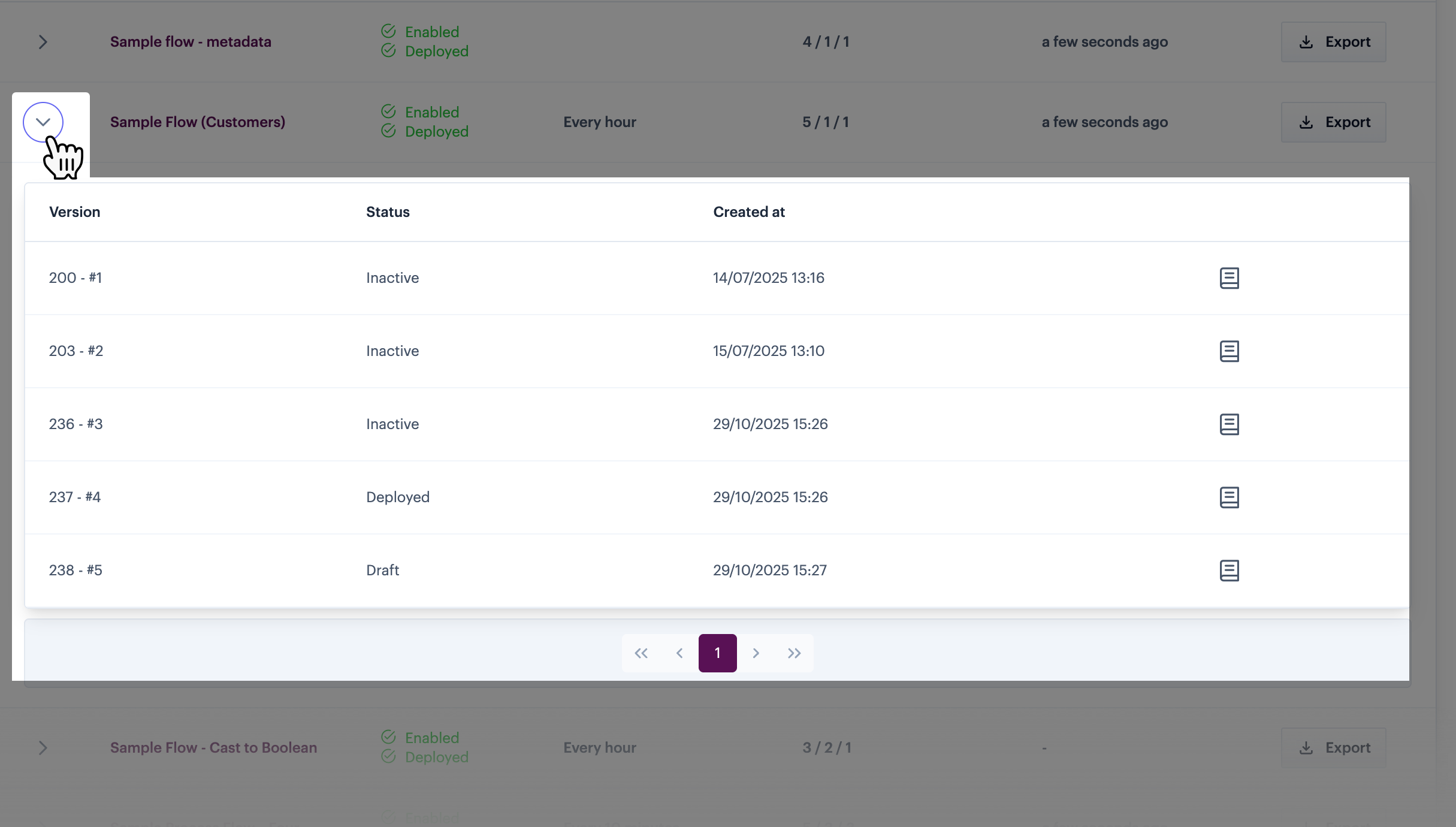
Each process flow entry is associated with an arrow, for example:

<figure><img src="https://2440044887-files.gitbook.io/~/files/v0/b/gitbook-x-prod.appspot.com/o/spaces%2FLYNcUBVQwSkOMG6KjZfz%2Fuploads%2FKB4QWHXd4YArtsBwYUJ3%2Fprocess%20flows%20page%20-%20version%20info.png?alt=media&#x26;token=1810e2da-c259-4114-afae-95a8a3643de1" alt=""><figcaption></figcaption></figure>

Click this arrow to view version details for the associated process flow. The information shown varies, depending on whether virtual environments are in use.

#### Virtual environments not in use

If the virtual environments feature is NOT enabled for your company profile, each version of the flow is listed, for example:

<figure><img src="https://2440044887-files.gitbook.io/~/files/v0/b/gitbook-x-prod.appspot.com/o/spaces%2FLYNcUBVQwSkOMG6KjZfz%2Fuploads%2FQ2SDOe8kQEcxNKNCBvnP%2Fprocess%20flows%20page%20-%20version%20info%20-%20no%20ve.png?alt=media&#x26;token=0a82bbf7-0459-4dfc-ba58-83338ab3f5bb" alt=""><figcaption></figcaption></figure>

Here, you can see:

<table><thead><tr><th width="213.1484375">Column</th><th>Summary</th></tr></thead><tbody><tr><td>Version</td><td>The version number and unique id.</td></tr><tr><td>Status</td><td>The current status of this version. Without <a href="../virtual-environments">virtual environments</a>, a process flow will only ever have one deployed version, one draft, and (where applicable) multiple inactive versions. For more information, please refer to <a href="building-process-flows/process-flow-versioning">Process flow versioning</a>.</td></tr><tr><td>Deployed by</td><td>If the version status is deployed, the date and time of the deployment is shown, together with the Patchworks username of the person who completed the deployment.</td></tr><tr><td>Created at</td><td>The date and time that the version was created.</td></tr></tbody></table>

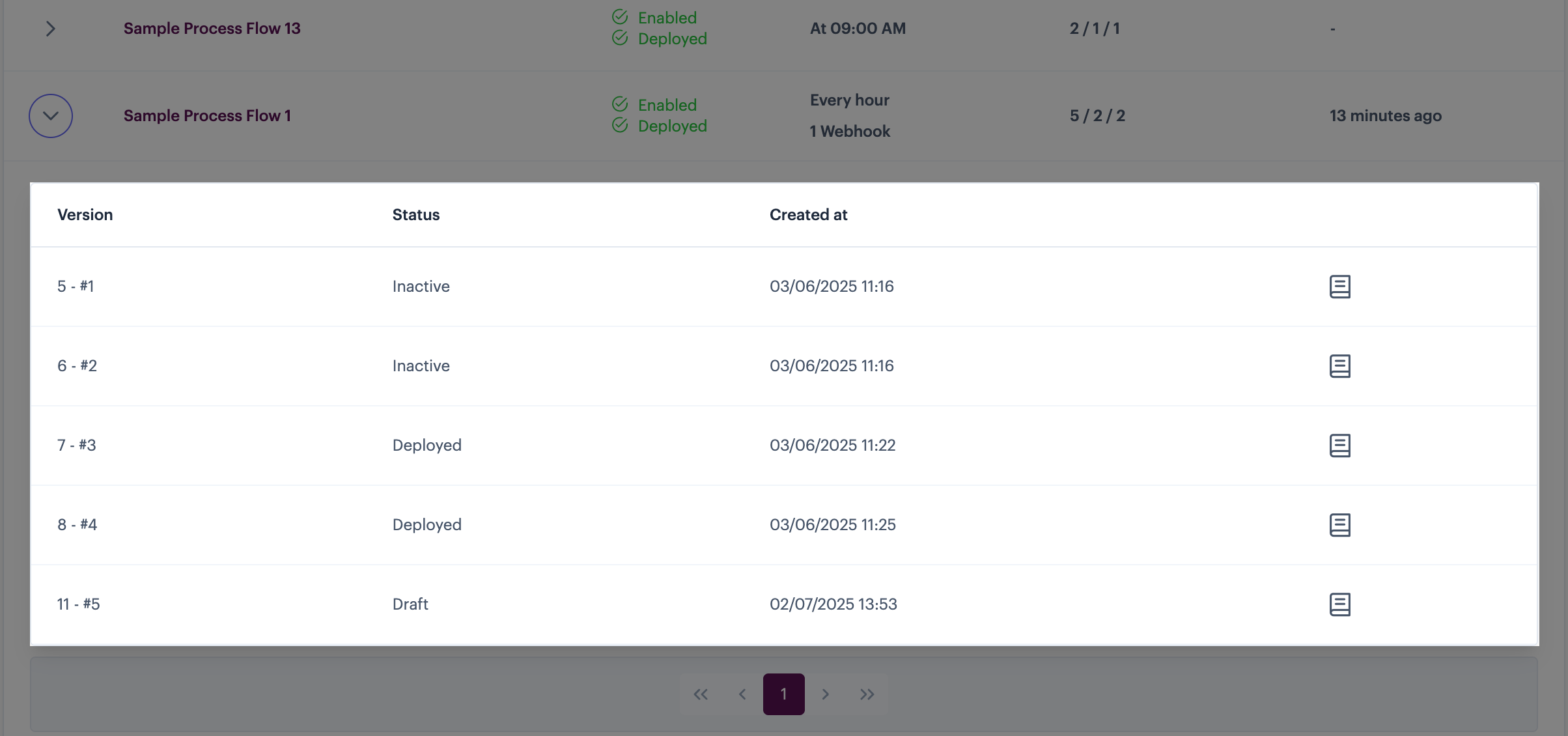
#### Virtual environments in use

If the virtual environments feature IS enabled for your company profile, each version of the flow is listed - for example:

<figure><img src="https://2440044887-files.gitbook.io/~/files/v0/b/gitbook-x-prod.appspot.com/o/spaces%2FLYNcUBVQwSkOMG6KjZfz%2Fuploads%2FpD0DjAnUsd8eLosdimpv%2Fprocess%20flows%20page%20-%20version%20info%20-%20ve.png?alt=media&#x26;token=7d20d08e-40ed-4950-adf6-fbcab25fe044" alt=""><figcaption></figcaption></figure>

Here, you can see:

<table><thead><tr><th width="213.1484375">Column</th><th>Summary</th></tr></thead><tbody><tr><td>Version</td><td>The version number and unique id.</td></tr><tr><td>Status</td><td>The current status of this version. With <a href="../virtual-environments">virtual environments</a>, a process flow might have multiple <code>deployed</code> versions, one <code>draft</code>, and (where applicable) multiple <code>inactive</code> versions. For more information, please refer to <a href="../virtual-environments/implementing-virtual-environments/deploying-a-single-process-flow-to-a-virtual-environment/understanding-flow-versioning-for-virtual-environments">Understanding flow versioning for virtual environments</a>.</td></tr><tr><td>Created at</td><td>The date and time that the version was created.</td></tr><tr><td>Deployment details icon</td><td>Click the deployment details icon to view deployment information for the selected version. If the version has been deployed at any time, you can see where (i.e. to which virtual environment) the deployment was made - for example:<br><br><img src="https://2440044887-files.gitbook.io/~/files/v0/b/gitbook-x-prod.appspot.com/o/spaces%2FLYNcUBVQwSkOMG6KjZfz%2Fuploads%2FWXzci5vct2aGwU57RN3u%2Fdeployment%20info.png?alt=media&#x26;token=d6744ad1-34b7-47c0-8a11-95e3db220e23" alt=""></td></tr></tbody></table>

### Create new flow

Use the [create new flow](https://doc.wearepatchworks.com/product-documentation/process-flows/building-process-flows/adding-a-new-process-flow) button to start [building a new process flow](https://doc.wearepatchworks.com/product-documentation/process-flows/building-process-flows):

<figure><img src="https://2440044887-files.gitbook.io/~/files/v0/b/gitbook-x-prod.appspot.com/o/spaces%2FLYNcUBVQwSkOMG6KjZfz%2Fuploads%2FKDjF1hy4v9j1PkUcq0Oh%2Fprocess%20flows%20page%20-%20create%20flow.png?alt=media&#x26;token=773f643c-133c-4f17-9c43-bfd79071de35" alt=""><figcaption></figcaption></figure>

### Deployed flows count

Each [core subscription tier](https://doc.wearepatchworks.com/product-documentation/getting-started/core-subscription-tiers) is associated with an allowed number of `deployed & enabled` process flows (i.e. active flows):

<div align="left"><figure><img src="https://2440044887-files.gitbook.io/~/files/v0/b/gitbook-x-prod.appspot.com/o/spaces%2FLYNcUBVQwSkOMG6KjZfz%2Fuploads%2F8rtC82DlNRKUSQRZ7Jun%2Fprocess%20flows%20page%20-%20deployed.png?alt=media&#x26;token=a58f2735-85b4-4e55-a5be-7922fc3d2290" alt=""><figcaption></figcaption></figure></div>