# Branch shape
## Introduction
The `branch` shape allows you to add shapes to multiple, distinct paths in a process flow, which are executed sequentially. Paths are executed one at a time, in the configured sequence, using the same incoming payload.
For complex scenarios, branching allows you to split the logic in your flow, making it easier to build, understand, and manage. For example, a common scenario for syncing orders between two systems is to:
**\[1]** Pull orders from the source system **\[2]** Check if the customer record exists in the destination system **\[3]** If not, create it **\[4]** Check if the address exists in the destination system **\[5]** If not, create it **\[6]** Decrement stock record in the destination system **\[7]** Send order info to the destination system
This can all be achieved using one long process flow; however, the `branch` shape provides the ability to organise the steps logically. So:
* Branch 1 creates/updates customer records
* Branch 2 creates/updates address records
* Branch 3 updates stock records
* Branch 4 sends the orders to a warehouse system
{% hint style="info" %}
A single incoming payload for [any process flow shape](https://open.gitbook.com/~site/site_dIV1g/~/revisions/9dTvdvRJIRVZQXuBMMnJ/process-flows/building-process-flows/process-flow-shapes) should not exceed 500MB.
We recommend processing multiple, smaller payloads rather than one single payload (1000 x 0.5MB payloads are more efficient than 1 x 500MB payload!).
For payloads up to 500MB, consider adding a[ flow control shape](https://open.gitbook.com/~site/site_dIV1g/~/revisions/9dTvdvRJIRVZQXuBMMnJ/process-flows/building-process-flows/process-flow-shapes/standard-shapes/flow-control-shape) to batch data into multiple, smaller payloads. Payloads exceeding 500MB should be batched at source.
{% endhint %}
## Need to know
* By default, the same data - i.e. any payloads that the `branch` shape receives - flow down every branch. For more information, see [How data flows through a branch shape](#how-data-flows-through-a-branch-shape).
* All steps in a branch must be completed before the next branch starts.
* If one branch fails, any subsequent branches will not start.
* Nested `branch` shapes are permitted - so you can have a `branch` shape within a branch.
* If a branch includes a [run process flow](https://doc.wearepatchworks.com/product-documentation/process-flows/building-process-flows/process-flow-shapes/standard-shapes/run-process-flow-shape) shape, the required sub-flow is triggered immediately, and subsequent branch steps continue. The `branch` shape does NOT wait for the sub-flow to complete.
* If a branch includes a [try/catch](https://doc.wearepatchworks.com/product-documentation/process-flows/building-process-flows/process-flow-shapes/standard-shapes/try-catch-shape) shape, the catch steps are processed at the end of the flow, not at the end of the branch.
* A `branch` shape should never include a [route](https://doc.wearepatchworks.com/product-documentation/process-flows/building-process-flows/process-flow-shapes/standard-shapes/route-shape) shape. Instead, use [filter](https://doc.wearepatchworks.com/product-documentation/process-flows/building-process-flows/process-flow-shapes/standard-shapes/filter-shape) shapes to achieve the same result - for example:\

* There is no limit on the number of branches that can be added for a `branch` shape.
## How data flows through a branch shape
By default, any payload that a `branch` shape receives passes through each branch, sequentially. Consider the example below:
Here, the `branch` shape receives five payloads from the preceding [flow control shape](https://doc.wearepatchworks.com/product-documentation/process-flows/building-process-flows/process-flow-shapes/standard-shapes/flow-control-shape). First, these five payloads are processed by `branch 1`, then the *same* five payloads are processed by `branch 2`, followed by `branch 3`.
However, what if we wanted to pass data from one branch to another? For example, suppose that `branch 1` includes a series of steps to prepare data for onward processing in branches 2, 3, and 4. For example:
In this case, we can add `branch 1` data to a [cache](https://doc.wearepatchworks.com/product-documentation/process-flows/building-process-flows/process-flow-shapes/advanced-shapes/cache/add-to-cache-shape), and then either:
* [Load cached data in any subsequent branches using a load from cache shape](#loading-branch-data-from-a-cache)
* [Reference cached data in any subsequent branches using a cache lookup transform](#referencing-branch-data-from-a-cache)
### Loading branch data from a cache
If you use the [add to cache](https://doc.wearepatchworks.com/product-documentation/process-flows/building-process-flows/process-flow-shapes/advanced-shapes/cache/add-to-cache-shape) shape in a branch, the cached data can be loaded later in the same branch and/or in subsequent branches. Placing a [load from cache](https://doc.wearepatchworks.com/product-documentation/process-flows/building-process-flows/process-flow-shapes/advanced-shapes/cache/load-from-cache-shape) shape at the very start of a branch results in the cached data being loaded into the branch and processed by subsequent shapes - i.e. this branch does NOT process the data received by the parent `branch` shape.
In the example below, `branch 1` prepares and filters *five* incoming payloads. At the end of this branch, *one* payload is filtered out, and *four* payloads are cached. At the start of `branch 2`, we load the cached data (*four* payloads) and these are processed by all subsequent shapes in this branch. Next, `branch 3` and `branch 4` do not load cached data, so these go on to process the original incoming payloads.
{% hint style="info" %}
For more information, please see the [add to cache shape](https://doc.wearepatchworks.com/product-documentation/process-flows/building-process-flows/process-flow-shapes/advanced-shapes/cache/add-to-cache-shape) and [load from cache shape ](https://doc.wearepatchworks.com/product-documentation/process-flows/building-process-flows/process-flow-shapes/advanced-shapes/cache/load-from-cache-shape)pages.
{% endhint %}
### Referencing branch data from a cache
You can use the [cache lookup transform function](https://doc.wearepatchworks.com/product-documentation/process-flows/building-process-flows/process-flow-shapes/standard-shapes/map-shape/working-with-field-transformations/available-transform-functions/other-transform-functions/cache-lookup-transform-function) to map field values from an existing cache. In this scenario, we aren't loading the cached data into the branch for onward processing - data coming through will be payloads that the parent `branch` shape received. This is shown in the example below:
{% hint style="info" %}
For more information, please see [Referencing a cache in mapping transformations](https://doc.wearepatchworks.com/product-documentation/process-flows/building-process-flows/process-flow-shapes/advanced-shapes/cache/referencing-a-cache-in-mapping-transformations) in our *cache* section.
{% endhint %}
## Adding a branch shape
{% stepper %}
{% step %}
**Add a branch shape**
In your process flow, add the `branch` shape in the usual way:
The shape is added to your flow with two path stubs - for example:
{% endstep %}
{% step %}
**Configure branches**
Click the `settings` icon for the `branch` shape:
Branch names are shown for the two placeholders:
...you can change these names as appropriate - for example:
...and add more branches if needed:
{% hint style="warning" %}
Having added new branches, the `branch` shape must be saved before they can be re-sequenced. Save the shape, and then return to settings to resequence the new branches.
{% endhint %}
{% endstep %}
{% step %}
**Save changes**
Once all branches have been added, save changes:
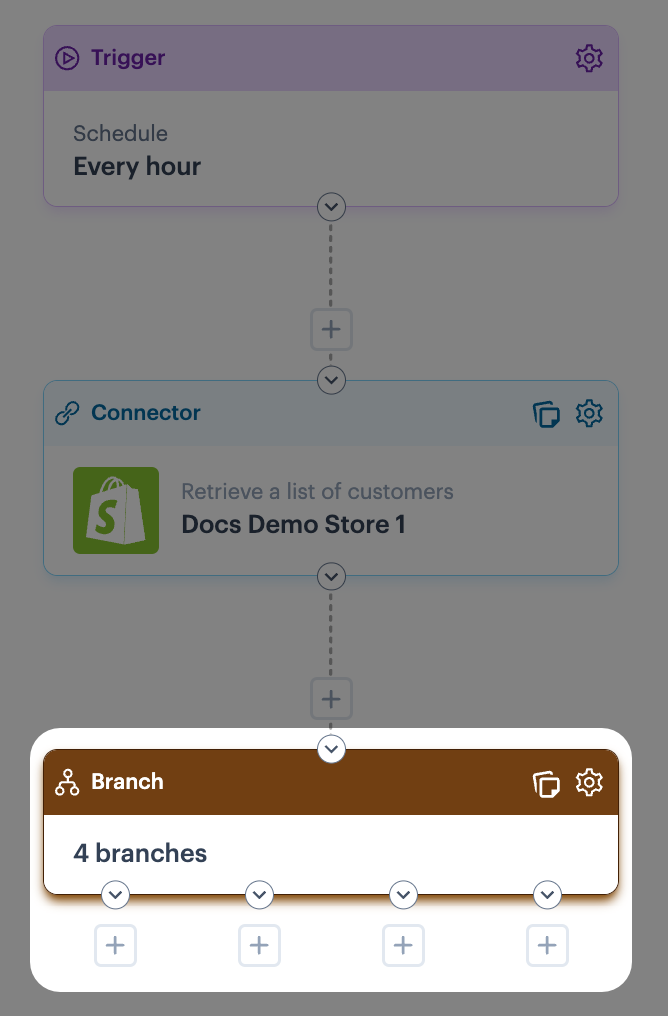
The `branch` shape is updated, and you'll see a placeholder stub for each branch you added in the previous step:
{% endstep %}
{% step %}
**Build branches**
Now you can add shapes to each branch in the normal way. As soon as you add your first shape to a branch, empty shapes are added to the others - for example:
Click on these placeholders to replace them with the required shape from the shapes palette:
{% hint style="info" %}
Nested branch shapes are allowed - so if required, you can have a `branch` shape within a branch:
There are no limitations on the number of nested levels; however, nesting too deeply will have an impact on flow clarity.
{% endhint %}
{% endstep %}
{% endstepper %}
## Managing branches
Having added branches to a branch shape, you may wish to:
* [Rename a branch](#renaming-a-branch)
* [Re-sequence a branch](#re-sequencing-branches)
* [Delete a branch](#deleting-a-branch)
These tasks are completed from `branch` shape settings:
### Renaming a branch
You can rename a branch at any time - simply overwrite the existing name and save shape settings:
### Re-sequencing branches
Before re-sequencing branches, ensure that any new branches have been saved (save the shape and re-access shape settings). Then it's just a matter of using up/down arrows to move branches to the right place:
### Deleting a branch
When a branch is deleted, it's removed entirely - any shapes currently defined in its path are also removed. To delete a branch, click the associated delete button:
## Managing branch paths
Shapes are added to branch paths in the normal way - add shapes from the shapes palette and configure them as needed.
{% hint style="warning" %}
If you remove the only shape in a branch path, the empty branch 'stub' remains in place, so sequencing doesn't change. If you don't need the branch anymore, access `branch` shape settings and [remove](#deleting-a-branch) it.
{% endhint %}




 There are no limitations on the number of nested levels; however, nesting too deeply will have an impact on flow clarity.
{% endhint %}
{% endstep %}
{% endstepper %}
## Managing branches
Having added branches to a branch shape, you may wish to:
* [Rename a branch](#renaming-a-branch)
* [Re-sequence a branch](#re-sequencing-branches)
* [Delete a branch](#deleting-a-branch)
These tasks are completed from `branch` shape settings:
There are no limitations on the number of nested levels; however, nesting too deeply will have an impact on flow clarity.
{% endhint %}
{% endstep %}
{% endstepper %}
## Managing branches
Having added branches to a branch shape, you may wish to:
* [Rename a branch](#renaming-a-branch)
* [Re-sequence a branch](#re-sequencing-branches)
* [Delete a branch](#deleting-a-branch)
These tasks are completed from `branch` shape settings:


