> For the complete documentation index, see [llms.txt](https://doc.wearepatchworks.com/product-documentation/llms.txt). Markdown versions of documentation pages are available by appending `.md` to page URLs; this page is available as [Markdown](https://doc.wearepatchworks.com/product-documentation/ai/patchworks-ai-studio/ai-assistant.md).

# AI Assistant

### Overview <a href="#overview" id="overview"></a>

The Assistant is where your conversations with AI Studio live. This unified chat panel brings everything together. No jumping around different agent windows.&#x20;

You can talk to any agent available to your company from here, return to an earlier conversation to see what was discussed, and continue it from where it stopped.

<div data-with-frame="true"><figure><img src="/files/e6nwxTcrl8ylKu71hTLK" alt="" width="375"><figcaption></figcaption></figure></div>

<table data-view="cards"><thead><tr><th></th><th></th></tr></thead><tbody><tr><td><p><strong>Every agent, one place</strong></p><p>Reach any agent available to your company without switching pages.</p></td><td></td></tr><tr><td><p><strong>Full conversation history</strong></p><p>Every exchange is kept, so you can see what was asked and what the agent did.</p></td><td></td></tr><tr><td><p><strong>Room to work</strong></p><p>A full-screen window instead of a docked panel - useful when an agent returns a flow, a mapping or a long answer.</p></td><td></td></tr></tbody></table>

### Accessing the Assistant <a href="#accessing" id="accessing"></a>

There are two routes, and both open the same full-screen view.

{% tabs %}
{% tab title="From the header" %}
Select the **AI** button in the top right of the application header.

This is available from wherever you are in Patchworks, so you don't need to navigate away from what you're working on first.
{% endtab %}

{% tab title="From the navigation menu" %}
Select **AI Studio** from the left-hand navigation menu, then **Assistant**.

You'll find it directly below Agents.
{% endtab %}
{% endtabs %}

{% hint style="info" %}
Access follows the existing `use ai-studio` permission. If you can't see AI Studio in the navigation menu, speak to an administrator for your company profile.
{% endhint %}

### From Header <a href="#conversations" id="conversations"></a>

<div data-with-frame="true"><figure><img src="/files/iCZ9dnMeFn55aRHgo9KY" alt="" width="356"><figcaption></figcaption></figure></div>

<div data-with-frame="true"><figure><img src="/files/tgoiNjU3adgQXgJAx1xH" alt=""><figcaption></figcaption></figure></div>

### Full Screen - Conversations  <a href="#conversations" id="conversations"></a>

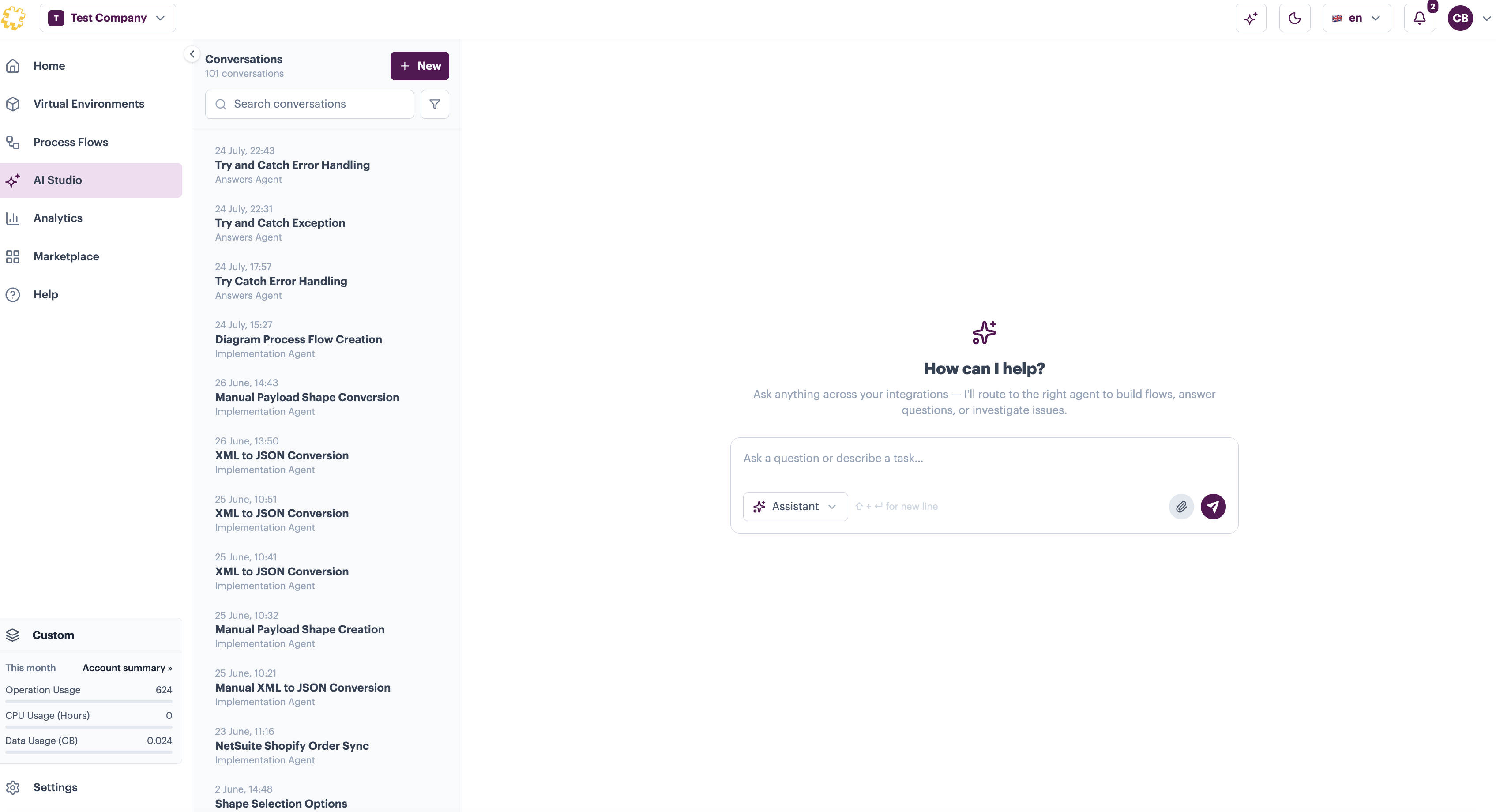
Conversations are listed down the left-hand side of the page, most recent first. Each one keeps the full exchange, so you can return to a flow you built last week and see exactly what was asked and what the agent did.

<div data-with-frame="true"><figure><img src="/files/h2lWrS3rGtQhWSsF0fw3" alt=""><figcaption></figcaption></figure></div>

From the conversations list you can:

* **Start a new conversation** - select **New** at the top of the list
* **Search your conversations** - useful once you've built up a history and you're looking for a particular piece of work
* **Return to an earlier conversation** - select it from the list to reopen it in the main window

{% hint style="info" %}
The Assistant replaces the previous AI Conversation History page. Your existing conversations are still available - they're now listed here.
{% endhint %}

### Working with agents <a href="#working-with-agents" id="working-with-agents"></a>

Any agent available to your company can be used from the Assistant. Which agents you have depends on what's installed - the Agents page shows what's available now and what's coming.

<div data-with-frame="true"><figure><img src="/files/VxPNY0158YIcTpqR851p" alt=""><figcaption></figcaption></figure></div>

Agents can also call on each other. If you ask something another agent is better placed to answer, that agent is brought into the conversation without you needing to switch pages or start again - a documentation question asked mid-conversation is handled by the Answers Agent and returned inline.

<br>