# NetSuite > Shopify - make payment

## Introduction

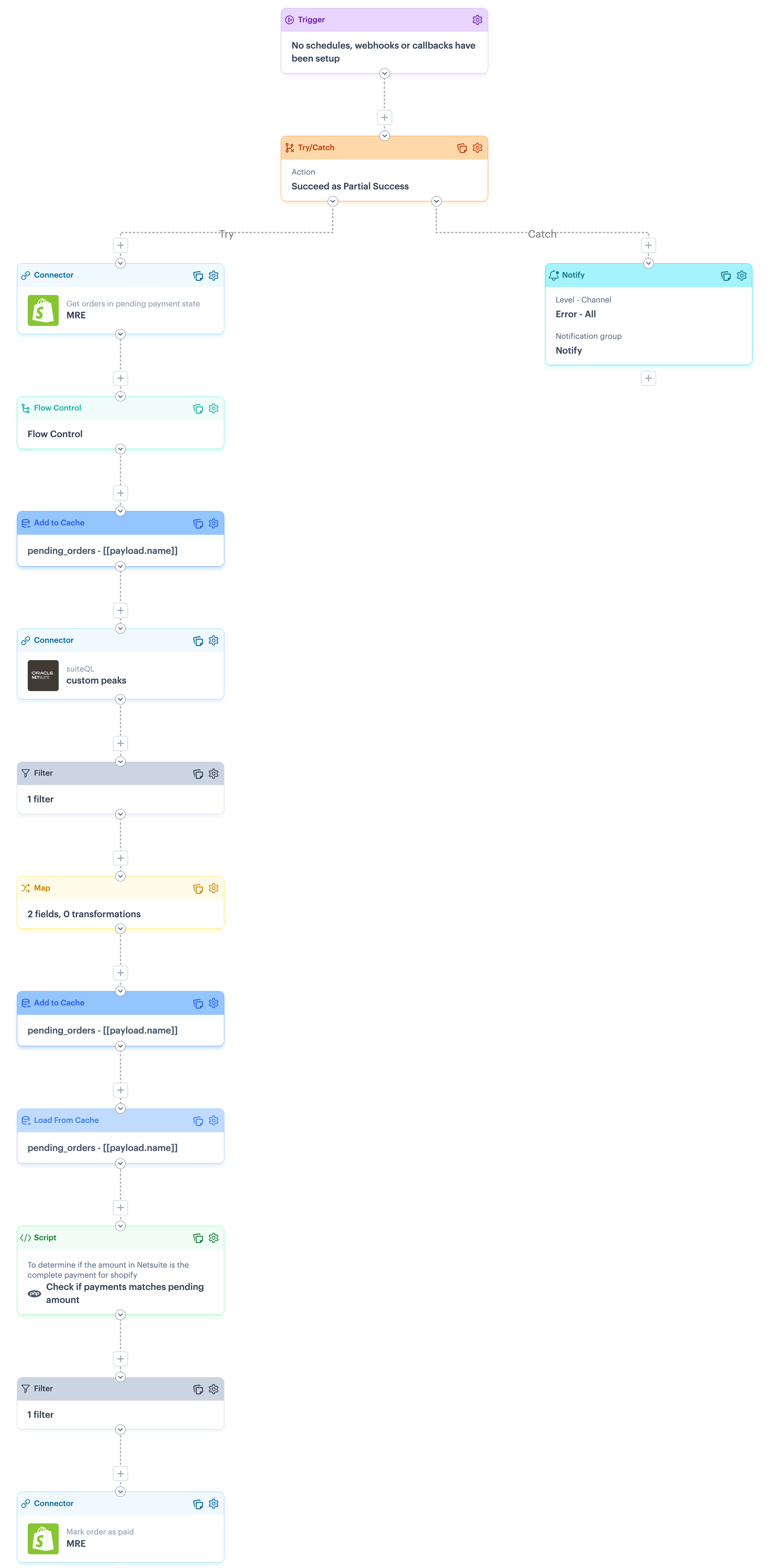
A GraphQL query retrieves all Shopify orders currently in a `pending` state. We then search NetSuite (by name) for a corresponding payment and if a match is found, the order is updated as `paid`.

{% hint style="warning" %}
This marks the order as fully paid, so the flow should only be used if orders are fully paid in NetSuite.
{% endhint %}

## Process flow snapshot

<details>

<summary><img src="https://2440044887-files.gitbook.io/~/files/v0/b/gitbook-x-prod.appspot.com/o/spaces%2FLYNcUBVQwSkOMG6KjZfz%2Fuploads%2FSUvxsp8XwrC9qsafJMIe%2Ficon%20process%20flow.svg?alt=media&#x26;token=ad1dc886-4a4e-4cad-9ad0-3d755e0f3b5a" alt="" data-size="line"> Click to view process flow snapshot</summary>

<img src="https://2440044887-files.gitbook.io/~/files/v0/b/gitbook-x-prod.appspot.com/o/spaces%2FLYNcUBVQwSkOMG6KjZfz%2Fuploads%2FWAeeFhaMz2KMAzAQ4Swl%2FNetSuite%20%3E%20Shopify%20-%20make%20payment%20full%20flow.png?alt=media&#x26;token=aa88a717-c710-49bc-b817-9ca0731e2890" alt="" data-size="original">

</details>

## Limitations

<table><thead><tr><th width="316.98828125">Limitation</th><th>Summary</th></tr></thead><tbody><tr><td>Partial payments</td><td>Based on limitations for Shopify stores that are not on the Plus plan, this flow does not support sending partial payments into Shopify. <br><br>If a NetSuite payment is found for a matching name, the order is marked as fully paid. </td></tr><tr><td>Shopify GraphQL error handling</td><td>There is a known limitation with error handling for Shopify GraphQL. Please refer to the <a href="../../installation-guide-shopify-and-netsuite/stage-5-review-update-and-test-process-flows-shopify-and-netsuite#error-handling-for-shopify-graphql">Error handling for Shopify GraphQL</a> section for more information and a suggested approach that you may wish to adopt in your flows. </td></tr></tbody></table>

## Assumptions

No assumptions noted for this flow.

## Customisation

To ensure that this process flow runs as required, some customisation options are available. These are documented in the following sections:

* [Flow variables](#flow-variables)
* [Process shape shapes](#process-flow-shapes)

### Flow variables

This process flow does not use flow variables.

### Process flow shapes

This process flow includes some shapes that can be configured with your own settings. Please see guidelines in the table below.

{% hint style="warning" %}
Shape settings determine the outcome of process flows. Do not change shape settings unless they are listed below.&#x20;
{% endhint %}

<table data-full-width="false"><thead><tr><th width="165.34375">Shape</th><th>Notes</th></tr></thead><tbody><tr><td>Trigger</td><td>This process flow is designed to be run manually.</td></tr><tr><td>Notify</td><td>This flow is designed in a try/catch structure, so notifications are generated if any part of the flow fails. To achieve this, the <code>catch</code> route includes a <a href="../../../../process-flows/building-process-flows/process-flow-shapes/standard-shapes/notify-shape">notify shape</a>, which must be configured for your own notification preferences. <br><br><code>Alert level</code>: Defaults to <code>error</code> but can be changed if needed<br><code>Channel</code>: Defaults to <code>email + log</code> but can be changed if needed<br><code>Email Limit</code>: Defaults to <code>5</code> but can be changed if needed<br><code>Notification Group</code>: Replace the <code>notify</code> placeholder which your required notification group. <br><code>Message</code>: If required, you can change the placeholder message.<br><br>For more information, please refer to our <a href="../../../../process-flows/building-process-flows/process-flow-shapes/standard-shapes/notify-shape">Notify shape</a> and <a href="../../../../general-settings/notification-groups">Notification groups</a> pages.</td></tr><tr><td>Connector (Shopify)</td><td>If you did not add or select a Shopify instance during the blueprint <a href="../installation-guide-shopify-and-netsuite/stage-4-install-the-blueprint-shopify-and-netsuite">installation process</a>, the following settings must be configured:<br><br><code>Source instance</code> : Set to your required <code>Shopify</code> instance.<br><code>Source endpoint</code> :  Set to <code>POST Get orders in pending payment state</code> </td></tr><tr><td>Connector (NetSuite)</td><td><p>If you did not add or select a NetSuite instance during the blueprint <a href="../installation-guide-shopify-and-netsuite/stage-4-install-the-blueprint-shopify-and-netsuite">installation process</a>, the following settings must be configured:<br><br><code>Source instance</code> : Set to your required <code>NetSuite</code> instance.<br><code>Source endpoint</code> :  Set to <code>POST suiteQL</code></p><p><code>Query</code>: Leave as the default</p></td></tr><tr><td>Connector (Shopify)</td><td>If you did not add or select a Shopify instance during the blueprint <a href="../installation-guide-shopify-and-netsuite/stage-4-install-the-blueprint-shopify-and-netsuite">installation process</a>, the following settings must be configured:<br><br><code>Source instance</code> : Set to your required <code>Shopify</code> instance.<br><code>Source endpoint</code> :  Set to <code>POST Mark order as paid</code> <br><code>Variables</code> : Leave the <code>Order ID</code> variable as it defaults. </td></tr></tbody></table>

## Reference

Reference information for this process flow is documented in the following sections:

* [Scripts used in this process flow](#scripts-in-this-process-flow)
* [Cross-reference lookups used in this process flow](#cross-reference-lookups-in-this-process-flow)

### Scripts in this process flow

This process flow does not use scripts.

### Cross-reference lookups in this process flow

This process flow does not use cross-reference lookups.