# Accepting a blueprint update manually

## Introduction

As the blueprint owner, you can make updates available, but the child company decides when to accept/apply them. This ensures that updates are applied at a convenient time, maintains transparency, and avoids unexpected changes to live integrations.

When an existing blueprint is updated and [set to active](https://doc.wearepatchworks.com/product-documentation/blueprints/working-with-private-blueprints/changing-the-active-version-for-a-private-blueprint), an `update available` indicator is added to this blueprint in the private marketplace for any 'child' company profiles where it's installed. Child company users (with [appropriate role permissions](https://doc.wearepatchworks.com/product-documentation/users-roles-and-permissions/roles-and-permissions-summary#private-blueprints)) can then accept the update at their own convenience.

## Need to know

* Any connector instances that you configured [when the blueprint was first installed](https://doc.wearepatchworks.com/product-documentation/blueprints/working-with-private-blueprints/installing-a-private-blueprint) will persist following any update.&#x20;
* When you choose to update a blueprint, you can choose what should happen with associated process flows after the update is installed.&#x20;
* During the update process, existing process flows associated with the blueprint are 'un-deployed' and at the end, only flows included in the update package are redeployed. So, if an existing process flow has been removed from the blueprint version being applied, it remains in place but is not redeployed.

## The steps

{% stepper %}
{% step %}
**Log in and switch to the required company profile**

Log in to the child company dashboard.
{% endstep %}

{% step %}
**Access private blueprints**

Select `marketplace` from the left-hand navigation menu, then select `blueprints` and `private` tabs. Here you will see any blueprints that have been built from the 'parent' company, or from the child company itself.&#x20;
{% endstep %}

{% step %}
**Select the blueprint with a pending update**

Select a blueprint with an update available flag - for example:

<figure><img src="https://2440044887-files.gitbook.io/~/files/v0/b/gitbook-x-prod.appspot.com/o/spaces%2FLYNcUBVQwSkOMG6KjZfz%2Fuploads%2FnY361k80kwGte5LVYfnE%2Finstall%20update%20manually%201.png?alt=media&#x26;token=f6764298-4567-47bd-9d9c-62d772a0703e" alt=""><figcaption></figcaption></figure>

The blueprint manifest is displayed for the version that's currently installed. For example:

<figure><img src="https://2440044887-files.gitbook.io/~/files/v0/b/gitbook-x-prod.appspot.com/o/spaces%2FLYNcUBVQwSkOMG6KjZfz%2Fuploads%2FyL1zCm625b00OjZtRjNA%2Finstall%20update%20manually%201a.png?alt=media&#x26;token=cf47b618-316c-4b20-9d80-35df3936c543" alt=""><figcaption></figcaption></figure>

{% hint style="info" %}
If necessary, you can choose to deselect items shown here. However, keep in mind that blueprints are designed and configured to work with the resources shown - you should only deselect items if you are confident that it's safe to do so.
{% endhint %}
{% endstep %}

{% step %}
**Switch to the active version (optional)**

If you want to review the contents of the `active` version, click in the version field and select the `active` version. For example:

<div align="left"><figure><img src="https://2440044887-files.gitbook.io/~/files/v0/b/gitbook-x-prod.appspot.com/o/spaces%2FLYNcUBVQwSkOMG6KjZfz%2Fuploads%2FvnDfdSZpKCp3kWMxGufl%2Finstall%20update%20manually%204a.png?alt=media&#x26;token=1fdb0779-3db0-4731-9eb3-d5340a4cda02" alt=""><figcaption></figcaption></figure></div>
{% endstep %}

{% step %}
**Install the active update**

Click the `install active version` button at the top of the page. For example:

<div align="left"><figure><img src="https://2440044887-files.gitbook.io/~/files/v0/b/gitbook-x-prod.appspot.com/o/spaces%2FLYNcUBVQwSkOMG6KjZfz%2Fuploads%2FhwglM6lItVs4UGlYYXcR%2Finstall%20update%20manually%205.png?alt=media&#x26;token=31e7b8c2-d2c1-475b-9d42-012e344efe62" alt=""><figcaption></figcaption></figure></div>
{% endstep %}

{% step %}
**Choose install options**

Choose what should happen immediately after the installation has completed. For example:

<div align="left"><figure><img src="https://2440044887-files.gitbook.io/~/files/v0/b/gitbook-x-prod.appspot.com/o/spaces%2FLYNcUBVQwSkOMG6KjZfz%2Fuploads%2FDAtE5sNJp1jeDe5Acmar%2Finstall%20flow%204.png?alt=media&#x26;token=543c5016-3568-4b84-be31-0c6618fea8b3" alt=""><figcaption></figcaption></figure></div>

Available options are summarised below:

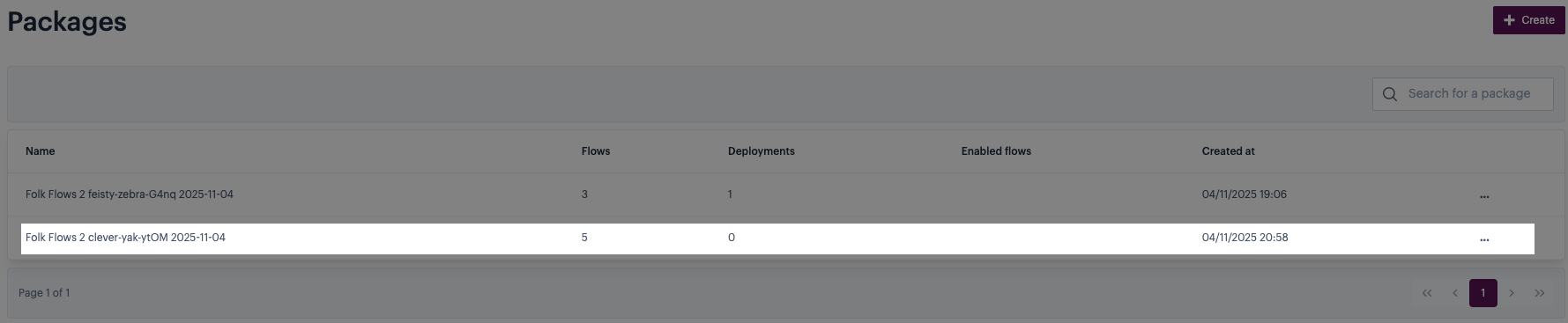
<table><thead><tr><th width="197.1796875">Field</th><th>Summary</th></tr></thead><tbody><tr><td>None</td><td><p>Process flows are installed from the blueprint but not deployed. Any existing <code>deployed</code> versions are unaffected. <br><br>For existing flows, the blueprint version becomes the latest <code>draft</code> version. </p><p></p><p>Any new flows are installed but disabled and un-deployed. </p><p></p><p>Any existing flows that have been removed from the blueprint are disabled and un-deployed.</p></td></tr><tr><td>Package flows</td><td><p>Creates a <a href="../../../virtual-environments/virtual-environment-packages">package</a> containing all process flows in the updated blueprint. The package name is set to the blueprint name, followed by the version and creation date. For example:<br><br><img src="https://2440044887-files.gitbook.io/~/files/v0/b/gitbook-x-prod.appspot.com/o/spaces%2FLYNcUBVQwSkOMG6KjZfz%2Fuploads%2FYvKBiixNuWtXiODG2c7y%2Fpackage%20name.png?alt=media&#x26;token=a7cf85cc-28c8-44b9-8286-6c2f778682ba" alt=""><br><br>When convenient, you should deploy this package to all required virtual environments. </p><p></p><p>During the update process, existing process flows associated with the blueprint are 'un-deployed' and at the end, only flows included in the update package are redeployed. So, if an existing process flow has been removed from the blueprint version being applied, it remains in place but is not redeployed.  </p></td></tr><tr><td>Package and redeploy</td><td>Creates a <a href="../../../virtual-environments/virtual-environment-packages">package</a> containing all process flows in the updated blueprint, then deploys this package to all <a href="../../../virtual-environments/about-virtual-environments">virtual environments</a> where a previous version exists (for the selected company profiles). <br><br>During the update process, existing process flows associated with the blueprint are 'un-deployed' and at the end, only flows included in the update package are redeployed. So, if an existing process flow has been removed from the blueprint version being applied, it remains in place but is not redeployed.  </td></tr></tbody></table>
{% endstep %}

{% step %}
**Confirm the update**

Having made your selections, click `continue` to start the update. For example:

<div align="left"><figure><img src="https://2440044887-files.gitbook.io/~/files/v0/b/gitbook-x-prod.appspot.com/o/spaces%2FLYNcUBVQwSkOMG6KjZfz%2Fuploads%2Fg02H9Ust0wmmUQSRx0By%2Finstall%20update%20manually%207.png?alt=media&#x26;token=fd9715f0-545c-4b66-9c84-54eee026a398" alt=""><figcaption></figcaption></figure></div>
{% endstep %}

{% step %}
**Review detected changes**

Any changes detected as a result of installing this update are displayed for review. For example:

<div align="left"><figure><img src="https://2440044887-files.gitbook.io/~/files/v0/b/gitbook-x-prod.appspot.com/o/spaces%2FLYNcUBVQwSkOMG6KjZfz%2Fuploads%2FRGSSh45DRcJToZ0NZ3r2%2Finstall%20update%20manually%208a.png?alt=media&#x26;token=d9c96308-a52e-418e-8e67-ad87603633ab" alt=""><figcaption></figcaption></figure></div>

If you're satisfied that these changes are correct, click `proceed` to perform the update:

<figure><img src="https://2440044887-files.gitbook.io/~/files/v0/b/gitbook-x-prod.appspot.com/o/spaces%2FLYNcUBVQwSkOMG6KjZfz%2Fuploads%2FDq0O2zAXuUhzX3ki4l2A%2Finstall%20update%20manually%208b.png?alt=media&#x26;token=eb725529-a0c4-4d66-a8ee-5a47bbafcb28" alt=""><figcaption></figcaption></figure>
{% endstep %}

{% step %}
**Complete post-update actions**

Action required after completing an update depends on which post-install action you selected in step 7. Guidelines are below:

<table><thead><tr><th width="197.99609375" valign="top">Post-install action</th><th valign="top">Status after update</th><th valign="top">Action required</th></tr></thead><tbody><tr><td valign="top"><code>none</code></td><td valign="top">The previous <code>draft</code> version of any existing process flows associated with this blueprint becomes <code>inactive</code>. <br><br>The blueprint version becomes the latest <code>draft</code> version.<br><br>Any existing <code>deployed</code> versions are unaffected.</td><td valign="top">Deploy the latest <code>draft</code> version manually, via <a href="../../../process-flows/building-process-flows/process-flow-settings">process flow settings</a>. For more information, please refer to <a href="../../../process-flows/managing-process-flows/flow-deployment/deploying-a-process-flow-with-virtual-environments">Deploying a process flow</a>.</td></tr><tr><td valign="top"><code>package flows</code></td><td valign="top">The updated set of process flows associated with the blueprint are added to a new package. <br><br>Any existing <code>deployed</code> versions are unaffected.</td><td valign="top"><a href="../../../virtual-environments/virtual-environment-packages/accessing-packages">Access the new package</a> and then <a href="../../../virtual-environments/virtual-environment-packages/managing-packages/deploying-a-package">deploy it to all required environments</a>. </td></tr><tr><td valign="top"><code>package and redeploy</code></td><td valign="top">Any existing <code>deployed</code> versions are un-deployed.<br><br>The updated set of process flows associated with the blueprint are added to a new package.<br><br>The new package is deployed to all selected company profiles, and all applicable virtual environments for those companies. The latest set of process flows is enabled and deployed.    </td><td valign="top">Review process flows in your selected companies to ensure the update has been applied correctly.</td></tr></tbody></table>
{% endstep %}
{% endstepper %}