Configuring usage alerts

Introduction

Usage alerts can be configured to send automated email notifications when your company's operations usage allowance reaches a given (percentage) threshold within a billing cycle.

Need to know

  • Usage alerts are based on a given 'allowance used' threshold - when this threshold is reached, email notifications are triggered.

  • Usage is checked, and email notifications are triggered at 8 am each day. For example, if you reach your threshold at 10 am on Tuesday, users will be notified at 8 am on Wednesday.

  • Email notifications for any given usage alert are sent ONCE in each billing cycle.

  • Email notifications are sent to specified notification groups.

  • You can define any number of usage alerts. For example, you might add one alert to trigger notifications when usage exceeds a 50% threshold, another for 30%, and another for 10%.

Who can create, manage & receive usage alerts?

The ability to create, manage, and receive alerts depends on the type of company profile - specifically, whether or not you manage or are managed by another company. Possible variations are summarised in the table below:

Manages multiple company profiles
Is managed by another company
Managing company is a powered-by profile
Is a powered-by profile
Can create & manage alerts
Receives alerts for own usage
Receives alerts for 'child' companies
no
no
n/a
no
yes
yes
n/a
no
yes
no
n/a
yes
yes
n/a
no
yes
yes
n/a
no
no
n/a
yes
n/a
n/a
no
yes
yes
no
yes
n/a
n/a
yes
yes
yes
yes
circle-info

Users with a manager role or above can create and manage usage alerts.

The steps

1

Review, add, or update notification groups

Select settingsnotification groups and check that the required notification groups are in place - if not, create them. For detailed information, please see our Notification groups section.

circle-info

If you need multiple alerts with different recipients for different usage thresholds, you should define multiple notification groups.

2

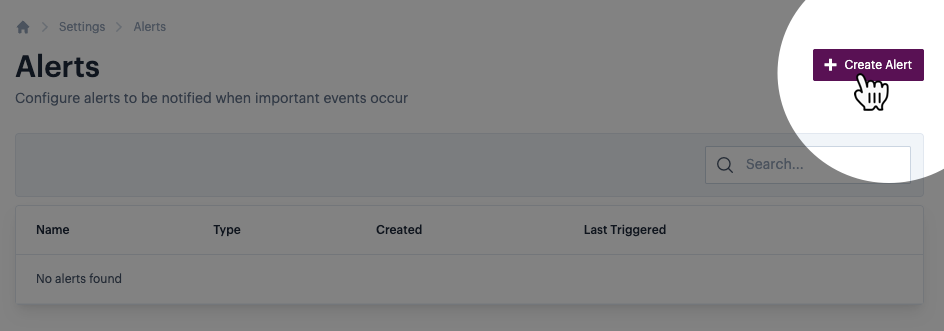
Create a usage alert

Select settingsalertscreate alerts:

3

Create a usage alert

Configure alert details:

Available fields are summarised below:

Field
Summary

Name

Enter your preferred name for this alert.

Alert type

Set to usage.

Threshold

Enter a value between 1 and 100. This is the percentage of your operation allowance that must be used to trigger alert emails. For example, entering 50 will trigger the alert when 50% or more of your allowance has been used.

Notiication group

Use the dropdown list to select the required notification group. You can select one notification group per alert.

4

Save changes

Click the save button to confirm alert details:

Last updated

Was this helpful?