Handling failed process flow runs
Introduction
Having confirmed/resolved any issues with a failed flow run, you can use the retry option to try again or - if there are lots of failures - use a bulk action to retry all current failures.
Need to know
Before retrying a flow run (either individually or as a bulk action), consider the points below:
A process flow must be enabled for the retry option to work.
It's advisable to check your process flow setup (e.g. triggers, filters and de-dupe shapes) to ensure that running the flow again will not duplicate any runs that may have succeeded in the interim.
A retry runs the original flow version, so it's only effective for failures caused by external factors (for example, if a third-party system is down, or bad data is received). If a failure is caused by a problem in your flow setup (for example, a transform function defined for an invalid data type), any flow amendments will be in a new version. In this scenario, you can choose to initialise a run manually instead.
If a process flow includes references to variables, be aware that any values for those variables may not be the same as they would have been if the failed flow had been successful.
About retry timings
When the retry option is used for a failed process flow run, the flow run is dispatched immediately*, using the current time to calculate any relative date filters and settings defined in the flow - unlike scheduled process flow runs, which are added to a queue.
*Retried runs are not added to a queue, which means they are processed as soon as possible. Often, this will be immediate, but in busier times, a retry job may be placed behind others.
To ensure that any time elapsed between the time a failed run was originally queued and the time it is retried, the current time for a retry always assumes the queued at time for the original run that failed.
Example
Suppose that a process flow is scheduled (via a trigger shape) to start at 13:00.
At 13:00, the run is initialised and added to a queue. The
queued at timeis set to 13:00.At 13:03, the queued run is processed. Because the use queued time process flow setting is toggled ON, the queue delay of 3 minutes is accounted for in all relative date/time settings defined in the flow.
The run fails.
At 17:00, the run is retried (via the run logs page). The retry happens immediately; however, the
current timeassumes the originalqueued attime of 13:00.
What happens after a retry?
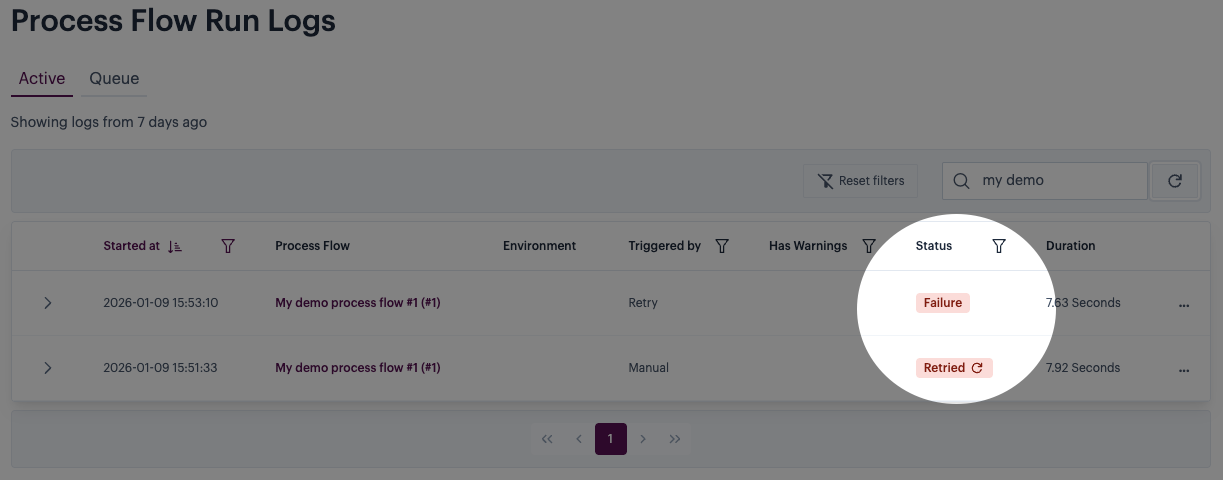
If a failed run is retried, its status is set to retried and a new log entry is added for the retried run. For example:

The colour associated with the retried status correlates to the outcome of that retry:
Blue
The retry is running now (look for a correlating running entry in the logs).
Green
The retry completed successfully (look for a correlating success entry in the logs).
Red
The retry failed (look for a correlating failure entry in the logs).
Pages in this section
Last updated
Was this helpful?