# Comparing packages

## Introduction

When a package is [deployed](https://doc.wearepatchworks.com/product-documentation/virtual-environments/virtual-environment-packages/managing-packages/deploying-a-package), all process flow versions included in that package are deployed to the selected virtual environment. If a version of a flow already exists in the given virtual environment, it is replaced by the package version.

With this in mind, it's good practice to check what the impact of deploying a package will be *before* you proceed to deploy it. To do this, you can use the package `compare` feature.

## Using the package compare feature

{% stepper %}
{% step %}
**Access virtual environment packages**

[Log in to the dashboard](https://app.wearepatchworks.com/virtual-environments) and select `virtual environments` | `packages` from the left-hand navigation menu.
{% endstep %}

{% step %}
**Find the required package**

Locate the package that you want to compare (you can scroll the list, step through multiple pages, or search).
{% endstep %}

{% step %}
**Select the compare option**

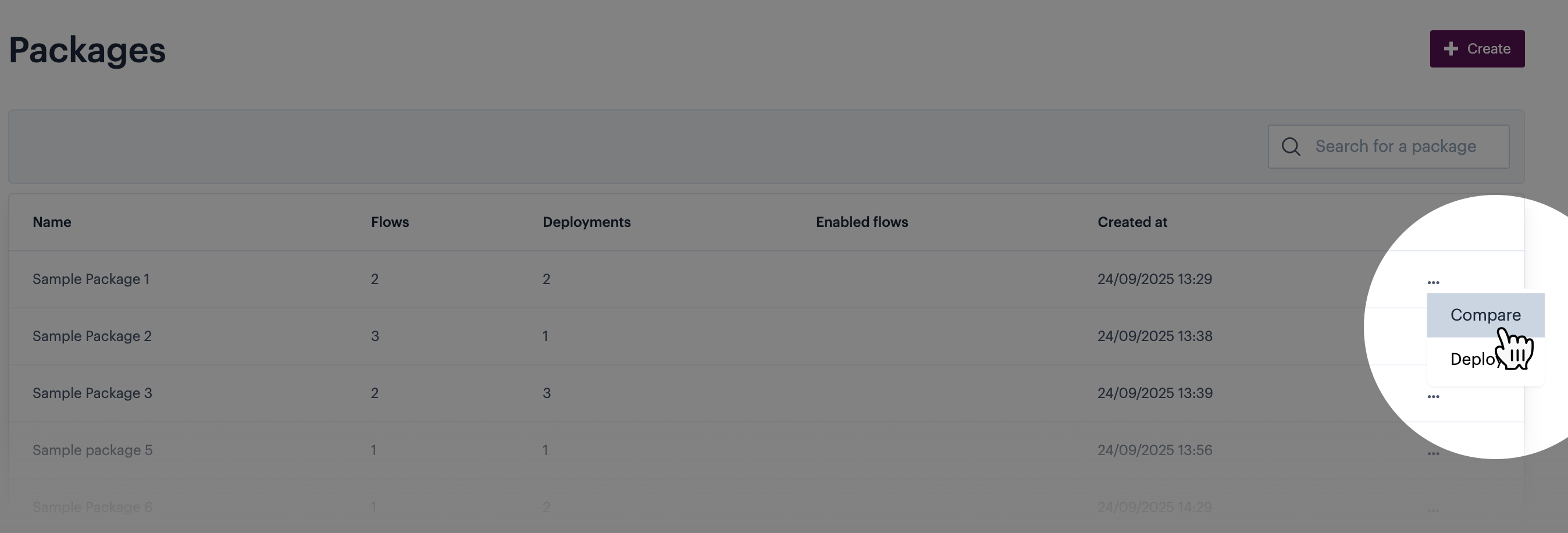
Click the ellipsis icon associated with the required package, then select the `compare` option:

<figure><img src="https://2440044887-files.gitbook.io/~/files/v0/b/gitbook-x-prod.appspot.com/o/spaces%2FLYNcUBVQwSkOMG6KjZfz%2Fuploads%2F4735cPo0RieArYZ7wmtg%2Fpackage%20compare%200.png?alt=media&#x26;token=49749e7d-d0b6-40f3-95da-e7112fe33d10" alt=""><figcaption></figcaption></figure>
{% endstep %}

{% step %}
**Select a virtual environment**

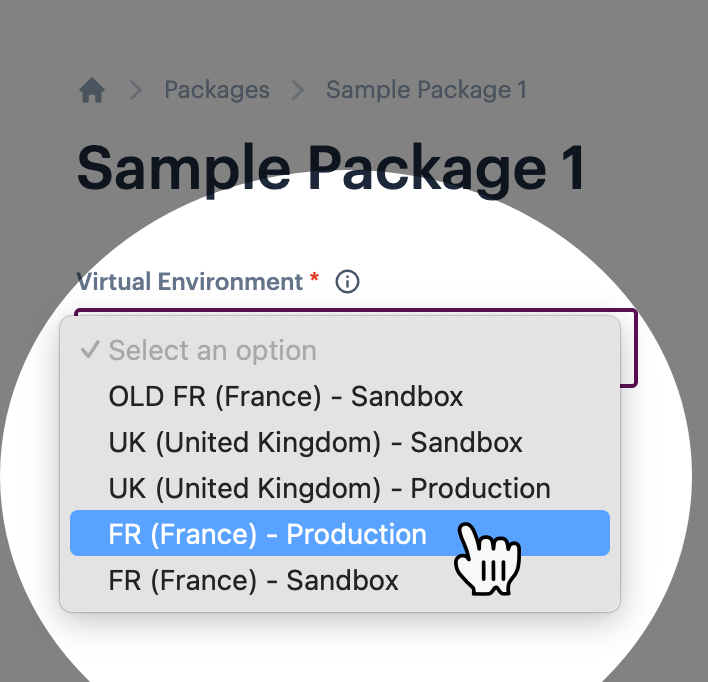
Click in the `virtual environment` field and select the required virtual environment - i.e. the environment against which you want to compare process flow versions for the package. For example:

<div align="left"><figure><img src="https://2440044887-files.gitbook.io/~/files/v0/b/gitbook-x-prod.appspot.com/o/spaces%2FLYNcUBVQwSkOMG6KjZfz%2Fuploads%2FMfqQXuJIgixy0chprBQx%2Fpackage%20compare%202.png?alt=media&#x26;token=adcfd738-29a8-4ed9-8dd8-36c48c812f42" alt="" width="354"><figcaption></figcaption></figure></div>
{% endstep %}

{% step %}
**Review comparison details**

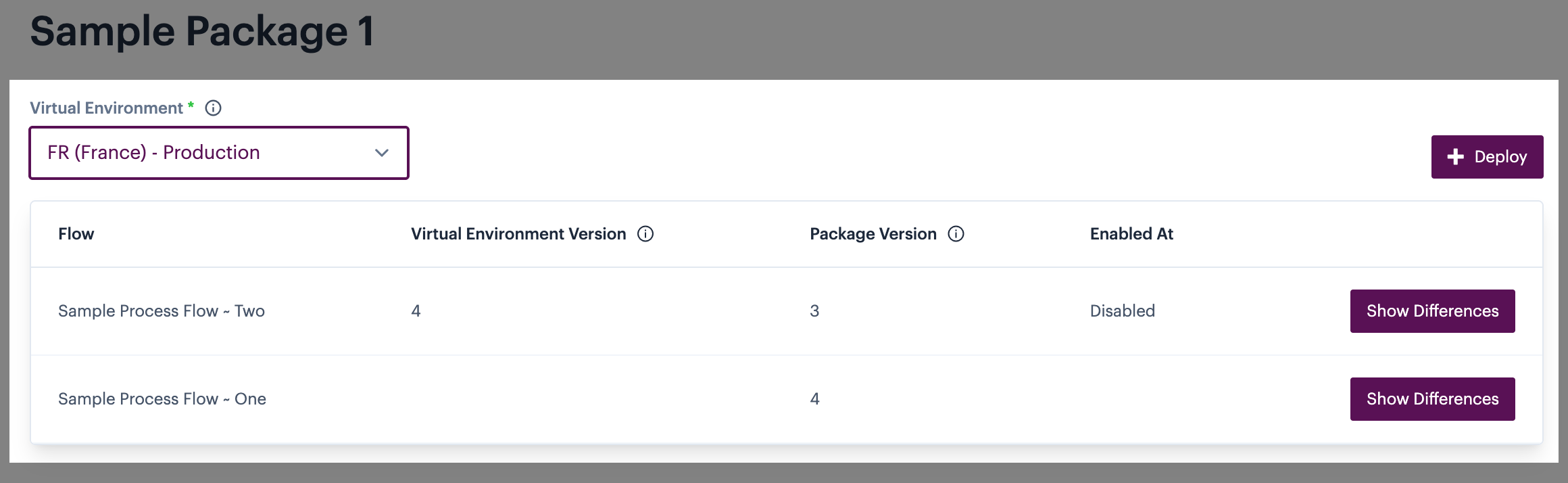
A comparison table is displayed, so you can compare flow versions in this package against any existing flow versions in the selected virtual environment - for example:

<figure><img src="https://2440044887-files.gitbook.io/~/files/v0/b/gitbook-x-prod.appspot.com/o/spaces%2FLYNcUBVQwSkOMG6KjZfz%2Fuploads%2F41TzXtlEyrh7RNNorP8L%2Fpackage%20compare%203.png?alt=media&#x26;token=c069550a-3b8d-4cf5-9dcf-03865ae260b5" alt=""><figcaption></figcaption></figure>

Details are summarised below:

<table><thead><tr><th width="161.3671875">Column</th><th>Summary</th></tr></thead><tbody><tr><td>Flow</td><td>Each process flow in this package is listed as a comparison entry.</td></tr><tr><td>Virtual environment version</td><td>If any version of the process flow is currently deployed in the selected virtual environment, the version number is shown here. If there's no existing version of this flow in the selected virtual environment, this column will be blank. </td></tr><tr><td>Package version</td><td>Shows the version of the associated flow that would be deployed now. If you opted to add the latest version of the flow to the package (when the package was <a href="../creating-a-package">created</a>), this version number may change over time. If you opted to add a specific version of the flow to the package, this version number will never change.</td></tr><tr><td>Enabled at</td><td>If the flow is enabled, the date and time this happened is shown.</td></tr></tbody></table>
{% endstep %}

{% step %}
**Review version differences**&#x20;

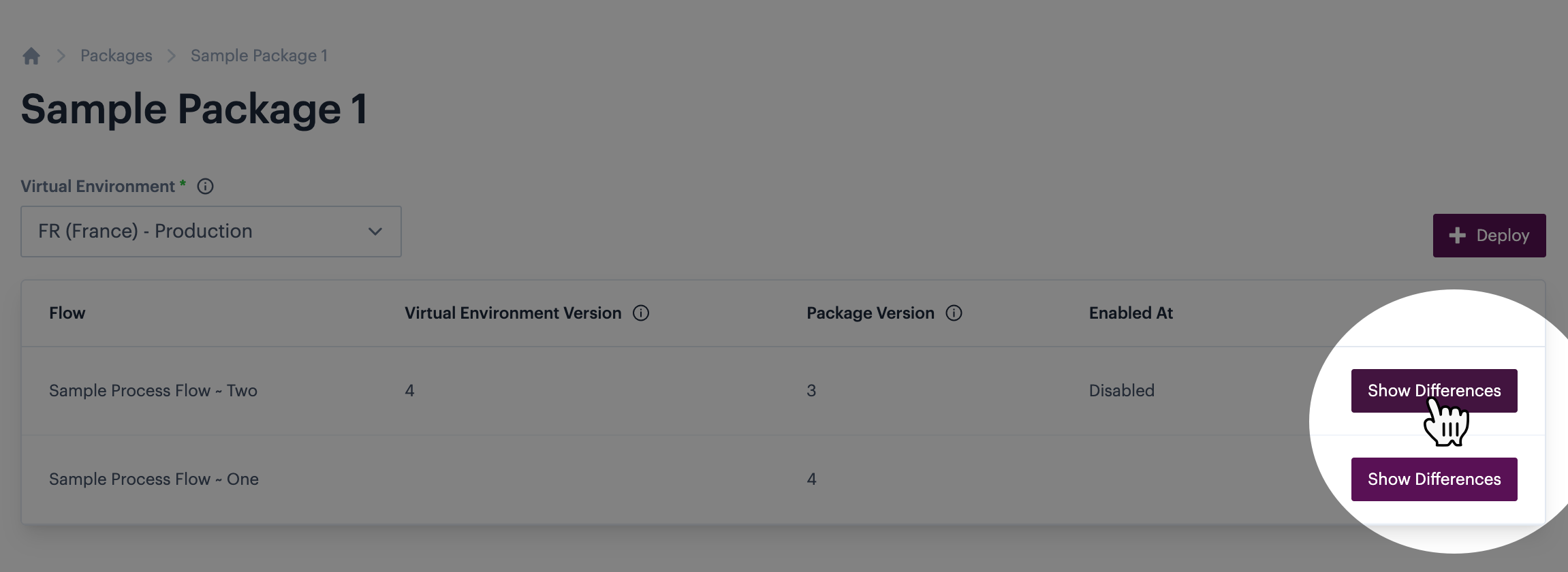
Click the `show differences` button associated with the flow that you want to review - for example:

<figure><img src="https://2440044887-files.gitbook.io/~/files/v0/b/gitbook-x-prod.appspot.com/o/spaces%2FLYNcUBVQwSkOMG6KjZfz%2Fuploads%2FKvMLyVch86wdpt5naIFw%2Fpackage%20compare%204.png?alt=media&#x26;token=d1624f0b-eba4-4d77-a625-cdddcea96389" alt=""><figcaption></figcaption></figure>

Any differences between the current virtual environment version and the package version are highlighted - for example:

<figure><img src="https://2440044887-files.gitbook.io/~/files/v0/b/gitbook-x-prod.appspot.com/o/spaces%2FLYNcUBVQwSkOMG6KjZfz%2Fuploads%2FlkZetN2BSbAVtOPYeMuF%2Fpackage%20compare%205.png?alt=media&#x26;token=1ade4f63-e159-44fb-8033-768fd8c19963" alt=""><figcaption></figcaption></figure>

Any differences are displayed with the current virtual environment item first (red) and the package item below (green).&#x20;

{% hint style="info" %}
To search within this output, click in the required left/right panel and then press CTRL+F to display search options:\
\
![](https://2440044887-files.gitbook.io/~/files/v0/b/gitbook-x-prod.appspot.com/o/spaces%2FLYNcUBVQwSkOMG6KjZfz%2Fuploads%2F8oiz6GYvAxtRe48uMvfr%2Fpackages%207.png?alt=media\&token=97062a5b-e846-43c0-a466-1a9987898aa0)
{% endhint %}

{% hint style="info" %}
If you're satisfied that the comparison details are correct and you want to deploy the package, you can use the deploy button at the top of the page to access [deployment options](https://doc.wearepatchworks.com/product-documentation/virtual-environments/virtual-environment-packages/managing-packages/deploying-a-package): \
\
![](https://2440044887-files.gitbook.io/~/files/v0/b/gitbook-x-prod.appspot.com/o/spaces%2FLYNcUBVQwSkOMG6KjZfz%2Fuploads%2FPvvRyRfVdvJBntvi4U3E%2Fpackage%20compare%206.png?alt=media\&token=55da2555-7096-4235-b447-6f3028142957)
{% endhint %}
{% endstep %}
{% endstepper %}