# NetSuite > Shopify - sync locations

## Introduction

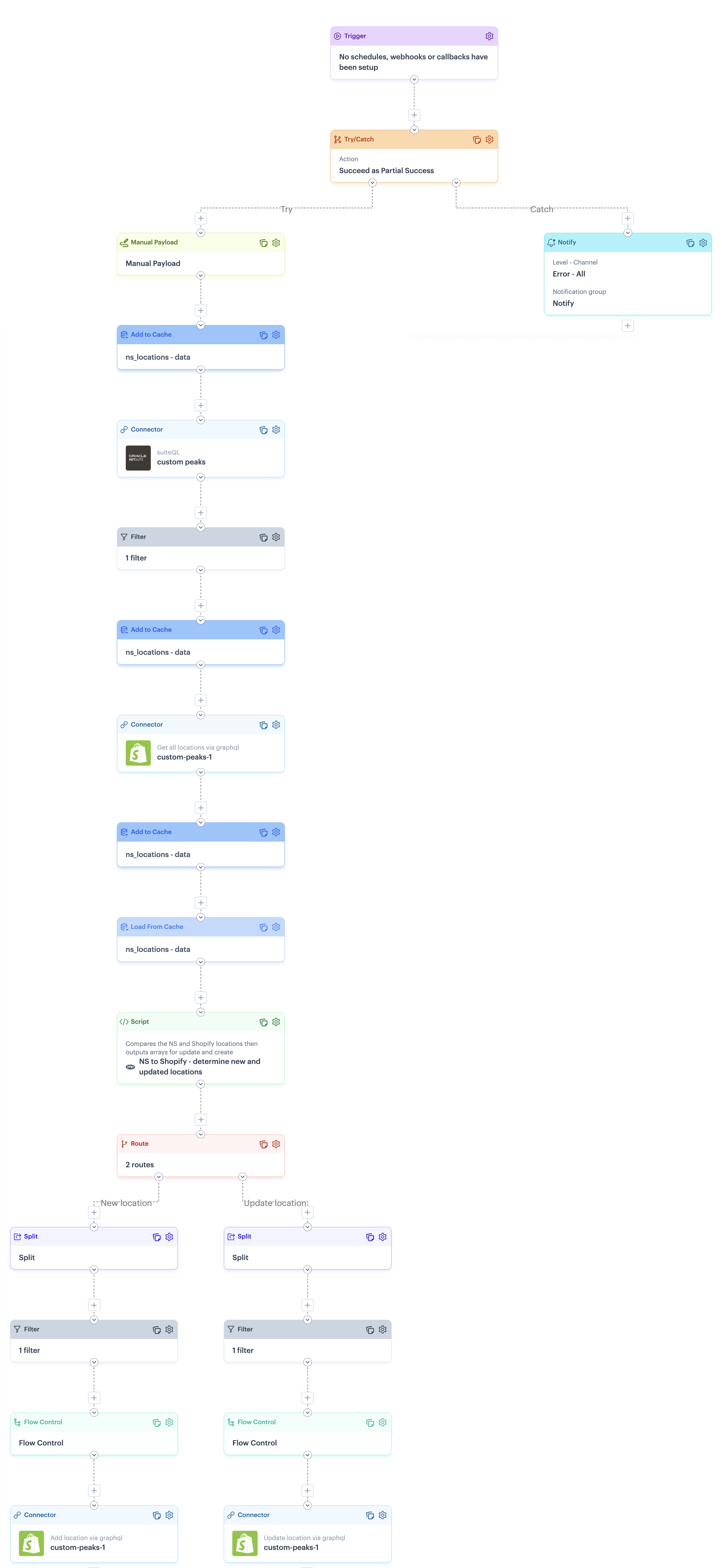
The `NetSuite > Shopify - sync locations` flow retrieves all locations from NetSuite, then runs a [script](#scripts-in-this-process-flow) to check if they exist in Shopify. New locations are created (via the first branch), and address details for existing locations are updated (via the second branch).

{% hint style="info" %}
This blueprint includes two process flows to handle the sync of locations between Shopify and NetSuite - you only need to run ONE, depending on which way you want the sync to work:

* [Shopify > NetSuite - sync locations](/product-documentation/blueprints/patchworks-blueprints/shopify-and-netsuite/available-process-flows-shopify-and-netsuite/shopify-greater-than-netsuite-sync-locations.md)&#x20;
* NetSuite > Shopify - sync locations *(this flow)*
  {% endhint %}

## Process flow snapshot

<details>

<summary><img src="/files/y1IE71BfODU6ZRj1HNMM" alt="" data-size="line"> Click to view process flow snapshot</summary>

<img src="/files/8XzL4BLAUI8YMm5p4Jg6" alt="" data-size="original">

</details>

## Limitations

<table><thead><tr><th width="266.79296875">Limitation</th><th>Summary</th></tr></thead><tbody><tr><td>Shopify GraphQL error handling</td><td>There is a known limitation with error handling for Shopify GraphQL. Please refer to the <a href="/pages/cAsDFgC7o0rXqfyJWolv#error-handling-for-shopify-graphql">Error handling for Shopify GraphQL</a> section for more information and a suggested approach that you may wish to adopt in your flows. </td></tr></tbody></table>

## Assumptions

No assumptions to note.

## Customisation

To ensure that this process flow runs as required, some customisation options are available. These are documented in the following sections:

* [Flow variables](#flow-variables)
* [Process shape shapes](#process-flow-shapes)

### Flow variables

This process flow does not use flow variables.

### Process flow shapes

This process flow includes some shapes that can be configured with your own settings. Please see guidelines in the table below.

{% hint style="warning" %}
Shape settings determine the outcome of process flows. Do not change shape settings unless they are listed below.&#x20;
{% endhint %}

<table data-full-width="false"><thead><tr><th width="165.34375">Shape</th><th>Notes</th></tr></thead><tbody><tr><td>Trigger</td><td>No default schedule is defined. If you decide that you want to sync locations in this direction (rather than from <a href="/pages/za3eovzlOYjeV16zk8LF">Shopify to NetSuite</a>), you may decide to add a schedule.</td></tr><tr><td>Notify</td><td>This flow is designed in a try/catch structure, so notifications are generated if any part of the flow fails. To achieve this, the <code>catch</code> route includes a <a href="/pages/qJOdm6pHm3I8Ovog6Ola">notify shape</a>, which must be configured for your own notification preferences. <br><br><code>Alert level</code>: Defaults to <code>error</code> but can be changed if needed<br><code>Channel</code>: Defaults to <code>email + log</code> but can be changed if needed<br><code>Email Limit</code>: Defaults to <code>5</code> but can be changed if needed<br><code>Notification Group</code>: Replace the <code>notify</code> placeholder which your required notification group. <br><code>Message</code>: If required, you can change the placeholder message.<br><br>For more information, please refer to our <a href="/pages/qJOdm6pHm3I8Ovog6Ola">Notify shape</a> and <a href="/pages/ul3TLNVYRLYUGugTOFLU">Notification groups</a> pages.</td></tr><tr><td>Connector (NetSuite)</td><td><p>If you did not add or select a NetSuite instance during the blueprint <a href="/pages/ZuNUyYvEy14sajACk8N9">installation process</a>, the following settings must be configured:<br><br><code>Source instance</code> : Set to your required <code>NetSuite</code> instance.<br><code>Source endpoint</code> :  Set to <code>POST suiteQL</code></p><p><code>Query</code>: Leave as the default</p></td></tr><tr><td>Connector (Shopify)</td><td>If you did not add or select a Shopify instance during the blueprint <a href="/pages/ZuNUyYvEy14sajACk8N9">installation process</a>, the following settings must be configured:<br><br><code>Source instance</code> : Set to your required <code>Shopify</code> instance.<br><code>Source endpoint</code> :  Set to <code>POST Get all locations via graphql</code></td></tr><tr><td>Connector (Shopify)<br><br><code>Route</code>: <code>New location</code> </td><td>If you did not add or select a Shopify instance during the blueprint <a href="/pages/ZuNUyYvEy14sajACk8N9">installation process</a>, the following settings must be configured:<br><br><code>Source instance</code> : Set to your required <code>Shopify</code> instance.<br><code>Source endpoint</code> :  Set to <code>POST Add location via graphql</code></td></tr><tr><td>Connector (Shopify)<br><br>Route: <code>Update location</code> </td><td>If you did not add or select a Shopify instance during the blueprint <a href="/pages/ZuNUyYvEy14sajACk8N9">installation process</a>, the following settings must be configured:<br><br><code>Source instance</code> : Set to your required <code>Shopify</code> instance.<br><code>Source endpoint</code> :  Set to <code>POST Upate location via graphql</code></td></tr></tbody></table>

## Reference

Reference information for this process flow is documented in the following sections:

* [Scripts used in this process flow](#scripts-in-this-process-flow)
* [Cross-reference lookups used in this process flow](#cross-reference-lookups-in-this-process-flow)

### Scripts in this process flow

<table><thead><tr><th width="293">Script</th><th>Summary</th></tr></thead><tbody><tr><td>NS to Shopify - determine new and updated locations</td><td>Compares shopify and netsuite locations and outputs graphQL payloads for those that are new and those that are to be updated. No mappings are required - these payloads are consumed directly.</td></tr></tbody></table>

### Cross-reference lookups in this process flow

No cross-reference lookups to note.


---

# Agent Instructions: Querying This Documentation

If you need additional information that is not directly available in this page, you can query the documentation dynamically by asking a question.

Perform an HTTP GET request on the current page URL with the `ask` query parameter:

```
GET https://doc.wearepatchworks.com/product-documentation/blueprints/patchworks-blueprints/shopify-and-netsuite/available-process-flows-shopify-and-netsuite/netsuite-greater-than-shopify-sync-locations.md?ask=<question>
```

The question should be specific, self-contained, and written in natural language.
The response will contain a direct answer to the question and relevant excerpts and sources from the documentation.

Use this mechanism when the answer is not explicitly present in the current page, you need clarification or additional context, or you want to retrieve related documentation sections.