# Shopify > NetSuite - create & update products

## Introduction

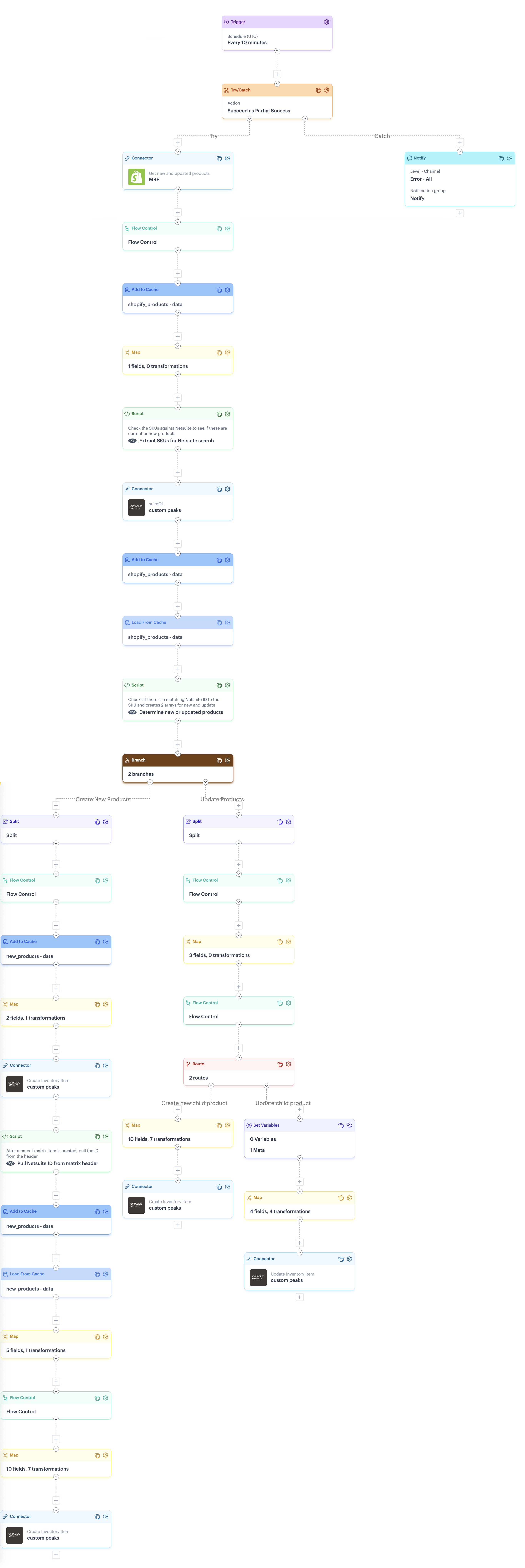
At a high level, this process flow will:

1. Fetch updated products from Shopify. A GraphQL request retrieves products modified since the last sync date.
2. Check if a product exists in NetSuite.The flow searches NetSuite by SKU to determine if each product already exists.
3. Create new products in NetSuite, where needed. If the product doesn't exist in NetSuite, a `parent` matrix item is created first, followed by child matrix items for any variants.
4. Update existing products in NetSuite, where needed. If the product already exists in NetSuite, the flow checks for new variants in Shopify. If yes, new `child` matrix items are created in NetSuite. If no, the `product price` is updated.&#x20;

## Process flow snapshot

<details>

<summary><img src="https://2440044887-files.gitbook.io/~/files/v0/b/gitbook-x-prod.appspot.com/o/spaces%2FLYNcUBVQwSkOMG6KjZfz%2Fuploads%2FSUvxsp8XwrC9qsafJMIe%2Ficon%20process%20flow.svg?alt=media&#x26;token=ad1dc886-4a4e-4cad-9ad0-3d755e0f3b5a" alt="" data-size="line"> Click to view process flow snapshot</summary>

<img src="https://2440044887-files.gitbook.io/~/files/v0/b/gitbook-x-prod.appspot.com/o/spaces%2FLYNcUBVQwSkOMG6KjZfz%2Fuploads%2FfQ8QrZEmRPzHx1UkJTtq%2FShopify%20%3E%20NetSuite%20-%20create%20%26%20update%20products%20full%20flow.png?alt=media&#x26;token=6e9caaa6-d6c3-4976-ba34-391de371bf10" alt="" data-size="original">

</details>

## Limitations

<table><thead><tr><th width="316.98828125">Limitation</th><th>Summary</th></tr></thead><tbody><tr><td>Product updates (general)</td><td>Currently, updates are limited to product price details.  </td></tr><tr><td>Product updates (NetSuite requirements)</td><td>Matrix options must already exist in NetSuite, with their unique internal IDs. These IDs are required for cross-reference lookups, defined during your <a href="../../installation-guide-shopify-and-netsuite/stage-1-patchworks-setup-shopify-and-netsuite#shopify-variants-greater-than-netsuite-internal-id">initial Patchworks setup</a>.</td></tr><tr><td>Fixed variant structure</td><td>When a product is first created, child matrix items determine which matrix options apply for the entire product. Given the current API and complexities around NetSuite matrix items, these matrix options cannot be changed or removed later; once set, the variant structure is locked for a product.</td></tr><tr><td>Shopify GraphQL error handling</td><td>There is a known limitation with error handling for Shopify GraphQL. Please refer to the <a href="../../installation-guide-shopify-and-netsuite/stage-5-review-update-and-test-process-flows-shopify-and-netsuite#error-handling-for-shopify-graphql">Error handling for Shopify GraphQL</a> section for more information and a suggested approach that you may wish to adopt in your flows. </td></tr></tbody></table>

## Assumptions

* SuiteQL compares Shopify SKUs to a value in NetSuite. To achieve this, comparison values are expected in the item `upccode` field, in NetSuite. If you use a different field to store this value, any connector queries, mappings and scripts referencing the `upccode` field must be updated. Please see the [Customisation ➤ process flow shapes](#process-flow-shapes) section for details.
* This process flow uses [cross-reference lookup tables](#cross-reference-lookups-in-this-process-flow). Please ensure that you have completed the relevant setup for these tables before running the flow. For further information, see our [Installation & setup guide ➤ Stage 1: Patchworks setup](https://doc.wearepatchworks.com/product-documentation/blueprints/patchworks-blueprints/installation-guide-shopify-and-netsuite/stage-1-patchworks-setup-shopify-and-netsuite#cross-reference-lookups).

## Customisation

To ensure that this process flow runs as required, some customisation options are available. These are documented in the following sections:

* [Flow variables](#flow-variables)
* [Process shape shapes](#process-flow-shapes)

### Flow variables

The table below summarises [flow variables](https://doc.wearepatchworks.com/product-documentation/process-flows/building-process-flows/dynamic-variables/flow-variables) defined for this process flow.

<table><thead><tr><th width="163.5078125">Flow variable</th><th>Summary</th><th>Default value</th></tr></thead><tbody><tr><td><code>updatedat</code></td><td>Set the relative number of days to look back for product updates. Update the default value as required.</td><td>-10 minutes UTC</td></tr></tbody></table>

{% hint style="info" %}
For information on working with flow variables, please refer to our [flow variables documentation](https://doc.wearepatchworks.com/product-documentation/process-flows/building-process-flows/dynamic-variables/flow-variables).
{% endhint %}

### Process flow shapes

This process flow includes some shapes that can be configured with your own settings. Please see guidelines in the table below.

{% hint style="warning" %}
Shape settings determine the outcome of process flows. Do not change shape settings unless they are listed below.&#x20;
{% endhint %}

<table data-full-width="false"><thead><tr><th width="196.69921875">Shape</th><th>Notes</th></tr></thead><tbody><tr><td>Trigger</td><td>The default schedule is set run every <code>10 minutes</code>. You can edit this shape and define your preferred run schedule. Keep in mind that the lookback period is determined by the <code>updatedat</code> <a href="#flow-variables">flow variable</a>, so these two settings should align. </td></tr><tr><td>Notify</td><td>This flow is designed in a try/catch structure, so notifications are generated if any part of the flow fails. To achieve this, the <code>catch</code> route includes a <a href="../../../../process-flows/building-process-flows/process-flow-shapes/standard-shapes/notify-shape">notify shape</a>, which must be configured for your own notification preferences. <br><br><code>Alert level</code>: Defaults to <code>error</code> but can be changed if needed<br><code>Channel</code>: Defaults to <code>email + log</code> but can be changed if needed<br><code>Email Limit</code>: Defaults to <code>5</code> but can be changed if needed<br><code>Notification Group</code>: Replace the <code>notify</code> placeholder which your required notification group. <br><code>Message</code>: If required, you can change the placeholder message.<br><br>For more information, please refer to our <a href="../../../../process-flows/building-process-flows/process-flow-shapes/standard-shapes/notify-shape">Notify shape</a> and <a href="../../../../general-settings/notification-groups">Notification groups</a> pages.</td></tr><tr><td>Connector (Shopify)</td><td>If you did not add or select a Shopify instance during the blueprint <a href="../installation-guide-shopify-and-netsuite/stage-4-install-the-blueprint-shopify-and-netsuite">installation process</a>, the following settings must be configured:<br><br><code>Source instance</code> : Set to your required <code>Shopify</code> instance.<br><code>Source endpoint</code> :  Set to <code>POST Get new and updated products</code><br><code>Updated at</code> : Set to <code>{{flow.variables.updatedat}}</code> <br><br><code>Updated at</code> references a <a href="#flow-variables">flow variable value</a>, defined in process flow settings.</td></tr><tr><td>Connector (NetSuite)</td><td><p>If you did not add or select a NetSuite instance during the blueprint <a href="../installation-guide-shopify-and-netsuite/stage-4-install-the-blueprint-shopify-and-netsuite">installation process</a>, the following settings must be configured:<br><br><code>Source instance</code> : Set to your required <code>NetSuite</code> instance.<br><code>Source endpoint</code> :  Set to <code>POST suiteQL</code></p><p><code>Query</code>: SuiteQL compares SKUs to a value in NetSuite. This NetSuite connector is configured with a query that expects the comparison value in <code>upccode</code>. If you use a different field, please update the query accordingly.</p></td></tr><tr><td>Script</td><td>The <code>Determine new or updated products</code> script expects NetSuite SKU comparison values in <code>upccode</code>. <br><br>If you use a different field to store these values (and you updated the NetSuite connector above accordingly), you must update this script to reflect the required field. Having saved and deployed your updated script, come back to this shape and ensure that the correct script version is selected. <br><br>For information about working with scripts, please refer to our <a href="../../../../developer-hub/custom-scripting">Custom scripting</a> section.</td></tr><tr><td>Connector (NetSuite)<br><br><code>Branch</code>: <code>Create new products</code></td><td>If you did not add or select a NetSuite instance during the blueprint <a href="../installation-guide-shopify-and-netsuite/stage-4-install-the-blueprint-shopify-and-netsuite">installation process</a>, the following settings must be configured:<br><br><code>Source instance</code> : Set to your required <code>NetSuite</code> instance.<br><code>Source endpoint</code> :  Set to <code>POST Create inventory item</code>    </td></tr><tr><td>Map<br><br><code>Branch</code>: <code>Create new products</code></td><td>If you do not use NetSuite's <code>upccode</code> field to store comparison values for Shopify SKUs, you must update this map shape - change the <code>upccode</code> mapping rule as appropriate.</td></tr><tr><td>Connector (NetSuite)<br><br><code>Branch</code>: <code>Create new products</code></td><td>If you did not add or select a NetSuite instance during the blueprint <a href="../installation-guide-shopify-and-netsuite/stage-4-install-the-blueprint-shopify-and-netsuite">installation process</a>, the following settings must be configured:<br><br><code>Source instance</code> : Set to your required <code>NetSuite</code> instance.<br><code>Source endpoint</code> :  Set to <code>POST Create inventory item</code>    </td></tr><tr><td><p>Map</p><p></p><p><code>Branch</code>: <code>Update products</code> ➤ <code>Create new child product</code> <br> </p></td><td>If you do not use NetSuite's <code>upccode</code> field to store comparison values for Shopify SKUs, you must update this map shape - change the <code>upccode</code> mapping rule as appropriate.</td></tr></tbody></table>

## Reference

Reference information for this process flow is documented in the following sections:

* [Scripts used in this process flow](#scripts-in-this-process-flow)
* [Cross-reference lookups used in this process flow](#cross-reference-lookups-in-this-process-flow)

### Scripts in this process flow

<table><thead><tr><th width="293">Script</th><th>Summary</th></tr></thead><tbody><tr><td>Extract SKUs for NetSuite search</td><td>Checks Shopify SKUs against NetSuite for new and existing products.</td></tr><tr><td>Determine new or updated products</td><td>Checks if there is a matching NetSuite ID to the SKU, then   creates two arrays -  one for the <code>new products</code> branch  and another for the <code>update products</code> branch.</td></tr><tr><td>Pull NetSuite ID from matrix header</td><td>Pulls the ID from the header after a parent matrix item is created.</td></tr></tbody></table>

### Cross-reference lookups in this process flow

<table><thead><tr><th width="322.93359375">Cross-reference lookup</th><th>Summary</th></tr></thead><tbody><tr><td>Shopify location > Netsuite Location ID</td><td>Maps locations from Shopify to NetSuite. Requires <a href="../../installation-guide-shopify-and-netsuite/stage-1-patchworks-setup-shopify-and-netsuite#shopify-location-greater-than-netsuite-location-id">setup before this process flow is used</a>. </td></tr><tr><td>Shopify variants > Netsuite internal ID</td><td> Maps Shopify product <code>size</code> values to the corresponding <code>internal ID</code> associated with NetSuite's <code>matrixoptioncustitem1</code> field. <a href="../../installation-guide-shopify-and-netsuite/stage-1-patchworks-setup-shopify-and-netsuite#shopify-variants-greater-than-netsuite-internal-id">Requires setup before this process flow is used</a>. </td></tr></tbody></table>