 Click to view process flow snapshot
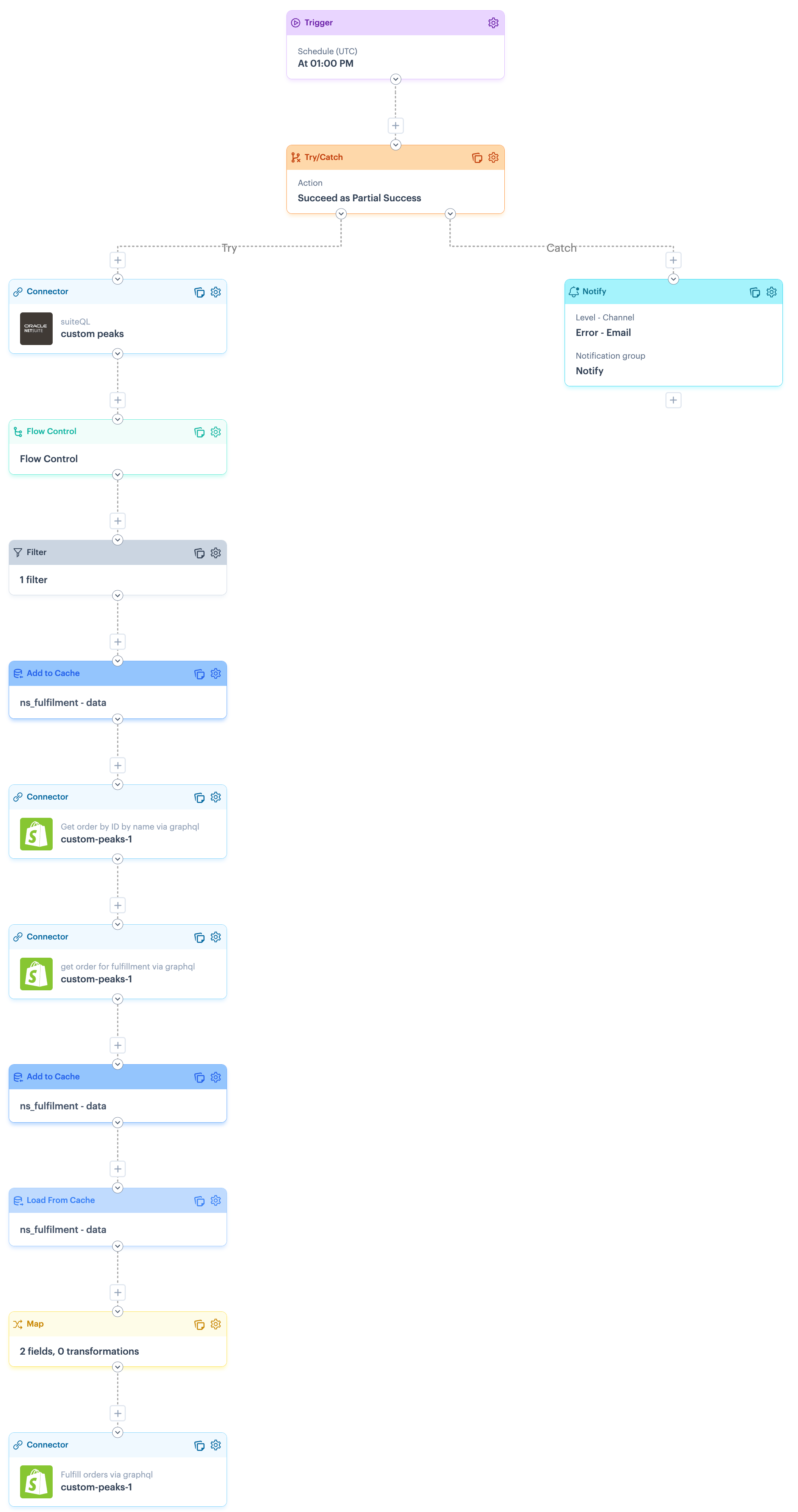 Click to view process flow snapshot
| Limitation | Summary |
|---|---|
| Carrier information in NetSuite. | Out of the box, NetSuite does not include a 'carrier' field in the package section of item fulfillments. |
| Fulfillment cancellations in Shopify | This flow will fail if an order has been fulfilled and then the fulfillment is subsequently cancelled in Shopify. |
| Shopify GraphQL error handling | There is a known limitation with error handling for Shopify GraphQL. Please refer to the Error handling for Shopify GraphQL section for more information and a suggested approach that you may wish to adopt in your flows. |
| Shape | Notes |
|---|---|
| Trigger | This SuiteQL query on the NetSuite connector retrieves fulfillment (shipment) records, together with related sales order and shipping details, for the past day. As such, the default schedule is defined to run once a day. You can update the schedule, but ensure that the NetSuite query is also updated to stay aligned. |
| Notify | This flow is designed in a try/catch structure, so notifications are generated if any part of the flow fails. To achieve this, the catch route includes a notify shape, which must be configured for your own notification preferences.Alert level: Defaults to error but can be changed if neededChannel: Defaults to email + log but can be changed if neededEmail Limit: Defaults to 5 but can be changed if neededNotification Group: Replace the notify placeholder which your required notification group.Message: If required, you can change the placeholder message.For more information, please refer to our Notify shape and Notification groups pages. |
| Connector (NetSuite) | If you did not add or select a NetSuite instance during the blueprint installation process, the following settings must be configured:
|
| Connector (Shopify) | If you did not add or select a Shopify instance during the blueprint installation process, the following settings must be configured:Source instance : Set to your required Shopify instance.Source endpoint : Set to POST Get order by ID by name via graphqlVariables : Leave the Order Name variable as it defaults. |
| Connector (Shopify) | If you did not add or select a Shopify instance during the blueprint installation process, the following settings must be configured:Source instance : Set to your required Shopify instance.Source endpoint : Set to POST Get order for fulfillment via graphqlVariables : Leave the Order ID variable as it defaults. |
| Connector (Shopify) | If you did not add or select a Shopify instance during the blueprint installation process, the following settings must be configured:Source instance : Set to your required Shopify instance.Source endpoint : Set to POST Fulfill orders via graphqlVariables : Leave the Fulfilment Order ID and Tracking Number variables as the defaults. |